ng-model and ng-bind Directive

ng-model Directive binds the value of AngularJS application data to HTML input controls.
ng-bind Directive tells AngularJS to replace the text content of HTML element with the value of the given expression, and to update the text content when the value of that expression changes.

Below is the sample code:

<!DOCTYPE html>
<html xmlns="http://www.w3.org/1999/xhtml">
<head>
    <script src="https://ajax.googleapis.com/ajax/libs/angularjs/1.3.14/angular.min.js"></script>
    <title>ng-bind and ng-model Directives</title>
</head>
<body ng-app="">
        <p>Enter your name: <input type="text" ng-model="name"/></p>
        <p>Hello <span ng-bind ="name"></span>!</p>
</body>
</html>

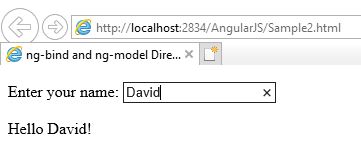
Below is the output of the above code when you run it in Internet Explorer.

Whenever you write something in textbox, the text after Hello automatically starts changing.

ng-init and ng-repeat Directive

ng-repeat Directive is used to repeat an HTML element for each item in the collection.
Below is a sample code for ng-repeat directive. I have used Visual Studio to write this code.

<!DOCTYPE html>
<html xmlns="http://www.w3.org/1999/xhtml">
<head>
    <script src="https://ajax.googleapis.com/ajax/libs/angularjs/1.3.14/angular.min.js"></script>
    <title>ng-repeat Directive</title>
</head>
<body ng-app="">
    <div ng-init="contacts=[{name: 'William', phone:'9876543210'},{name:'John', phone:'7777666543'},{name:'Mike',phone:'7778456734'}]">
        <p>Below are the list of Contacts:</p>
        <ol>
            <li ng-repeat="contact in contacts">
                {{'Name: ' + contact.name + ', Phone: ' + contact.phone}}
            </li>
        </ol>
    </div>
</body>
</html>

Below is the output of the above code:

Sample AngularJS Application

Below is the sample code for AngularJS Application:

<!DOCTYPE html>
<html xmlns="http://www.w3.org/1999/xhtml">
<head>
    <script src="https://ajax.googleapis.com/ajax/libs/angularjs/1.5.2/angular.min.js"></script>
    <title>Hello</title>
</head>

<body ng-app="myapp">

    <div ng-controller="HelloWorldController">
        <h3>Hello {{hello.title}} !!</h3>
    </div>

    <script>
        angular.module("myapp", [])
        .controller("HelloWorldController", function ($scope) {
            $scope.hello = {};
            $scope.hello.title = "Akanksha";
        });
    </script>
</body>
</html>

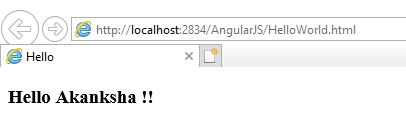
Below is the output of the above code when run in Internet Explorer. You can also use any other browser.

In the above code, we have first included the reference file to AngularJS in the HEAD section so that we can use it in our HTML page.

<head>
   <script src="https://ajax.googleapis.com/ajax/libs/angularjs/1.5.2/angular.min.js"></script>
   <title>Hello</title>
</head>

To bind HTML page to AngularJS, we have to include ng-app directive either in HTML tag or BODY tag. This helps HTML document to locate where AngularJS cod is located. Here we are creating an angular module named myapp.

<html ng-app = "myapp"></html> // OR
<body ng-app = "myapp"></body>

This is the View part of the AngularJS application that is displayed on HTML page and all HTML tags are included in this part. ng-controller tells AngularJS which controller to use with the current view. hello.title tells AngularJS to write the “model” value named hello.title to the HTML at this location.

<div ng-controller="HelloWorldController">
<h3>Hello {{hello.title}} !!</h3>
</div>

This is the Controller part of AngularJS application. This code registers a controller function HelloWorldController in myapp module. The controller function is registered in angular via angular.module().controller() function.

<script>
        angular.module("myapp", [])
        .controller("HelloWorldController", function ($scope) {
            $scope.hello = {};
            $scope.hello.title = "Akanksha";
        });
    </script>

The $scope parameter passed to the controller function is the model. The controller function adds a hello JavaScript object, and in that object it adds a title field.
AngularJS Introduction

AngularJS is a JavaScript Framework to create Single Page Application projects. It basically extends the existing HTML DOM elements and make them more responsive to user actions. It is open source and completely free.

Before learning AngularJS, you should have the basic knowledge of HTML, CSS, JavaScript and any Web Development text editor say Visual Studio or any other.

Some features of AngularJS are as follows:

  • It uses JavaScript as the Framework to develop Client-Side Applications.
  • AngularJS applications are cross-browser compliant.
  • It is free and open source.
  • It is Unit Testable.
  • Provides reusable components.
  • It follows MVC(Model, View, Controller) model.

Few definitions in AngularJS:

  • Scope: These are the objects that refer to the model. They act as a bridge between controller and view.
  • Controller: These are JavaScript functions that are bound to a particular scope.
  • Filters: These selects a subset of items from an array and returns a new array with the selected item.
  • Directives: They are markers on DOM elements like elements, attributes, CSS etc. They are used to create custom HTML tags. There are many built-in directives available like ng-app, ng-model, ng-bind etc.

AngularJS main directives:

  • ng-app: This directive defines and links an AngularJS application to HTML page.
  • ng-model: This directive binds the values of AngularJS application data to HTML input controls.
  • ng-bind: This directive binds the AngularJS application data to HTML tags.

For list of other directive, please click here.

Setup the Environment

Download AngularJS from here.

Power Platform Academy

Start or Upgrade your Career with Power Platform

Learn with Akanksha

Python | Azure | AI/ML | OpenAI | MLOps

Design a site like this with WordPress.com
Get started