Arrays in Functions

Arrays topic in TypeScript is divided into following parts:

In previous article, we have seen how to pass normal parameters in functions. Now we will see how to pass arrays as parameters in function and how to return arrays from functions.

Array As Function Parameters
var indianStates:string[] = ["Punjab","Haryana", "Kerela","Tamil Nadu","Bihar"];
displayStates(indianStates);

function displayStates(states:string[]){
    var i;
    for(i=0; i<states.length;i++){
        console.log(states[i]);
    }
}

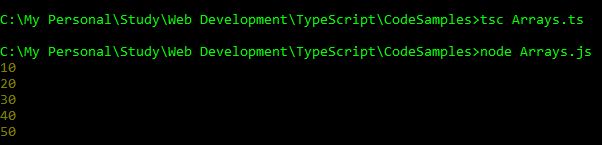
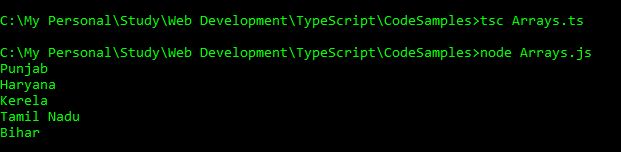
Below is the output of above code

Return Array from Function

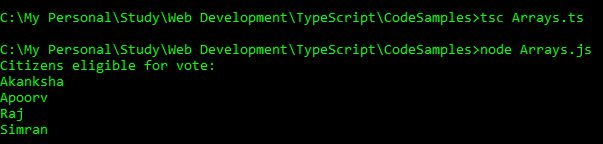
In below example, we will return the name of citizens who are eligible for vote.

var personAge:any[][] = [["Akanksha","Aarav","Apoorv","Raj","Simran"],[26,10,30,40,19]];
var citizens:string[] = voteValidity(personAge);
var i;
console.log("Citizens eligible for vote:");
for(i=0; i<citizens.length; i++){
    console.log(citizens[i]);
}
function voteValidity(age:any[][]):string[]{
    var names:any =  new Array();
    var j:number;
    for(j=0; j<5; j++){ if(age[1][j] > 18){
                names.push(age[0][j]);
            }
    }
    return names;
}

Below is the output of above code

Multidimensional Arrays

Arrays topic in TypeScript is divided into following parts:

Till now we have seed only single dimensional arrays which had only one row with values. In this section, we will discuss Multidimensional Arrays. Multidimensional Arrays are arrays with multiple rows and columns.

In this example, we will see an example of arrays with 3 rows and 3 columns.

var nums:number[][] = [[10,20,30],[40,50,60],[70,80,90]];
var i,j;
console.log("Using for loop!");
for(i=0; i<3; i++){
    for(j=0; j<3; j++)
    {
        console.log("[" + i + "]" + "[" + j + "]: " + nums[i][j]);
    }
}
console.log("Accessing directly!");
console.log("[0][1]: " + nums[0][1]);
console.log("[0][2]: " + nums[0][2]);
console.log("[0][0]: " + nums[0][0]);
console.log("[2][1]: " + nums[2][1]);
console.log("Index out of range:[3][0] " + nums[3][0]);

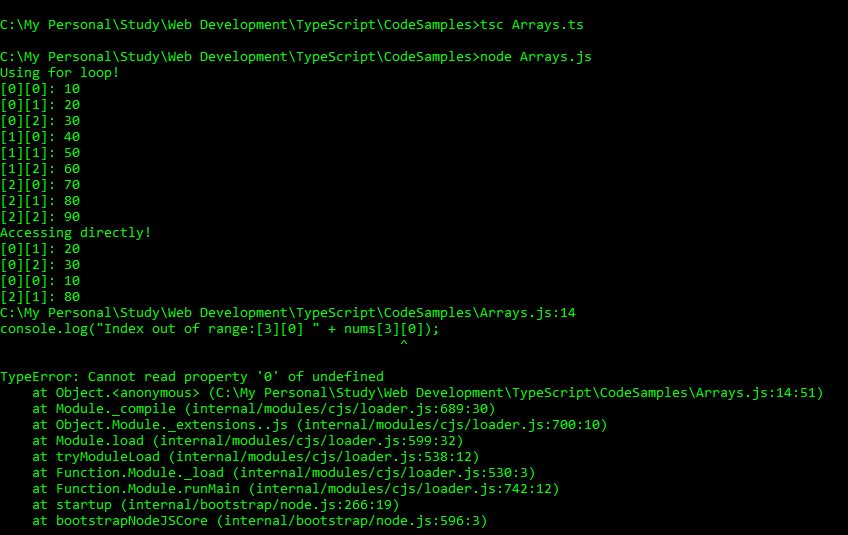
Below is the output of above code

Methods in Arrays – Part 3

Arrays topic in TypeScript is divided into following parts:

Below are the methods that are discussed in this section

reverse shift slice some
sort splice toString unshift
reverse

This method place the array elements in the reverse order.
Syntax

array.reverse();

Below is a sample code

var orgArr:number[] = [10,20,300];
console.log("Original array: " + orgArr);
var newArr:number[];
newArr = orgArr.reverse(); // assign the reversed array in a new array
console.log("Reversed Array: " + newArr); 
console.log("Original array is also modified: " + orgArr); // original array is also reversed

Below is the output of above code

shift

This method removes the first element of the array and returns that element, hence modifying the length of the array.
Syntax

array.shift();

Below is a sample code

var orgArr:number[] = [10,20,300];
console.log("Original array: " + orgArr);
console.log("Length of Original Array: " + orgArr.length);
var num:number = orgArr.shift();
console.log("First element: " + num);
console.log("Modified array: " + orgArr);
console.log("Length of Modified Array: " + orgArr.length);

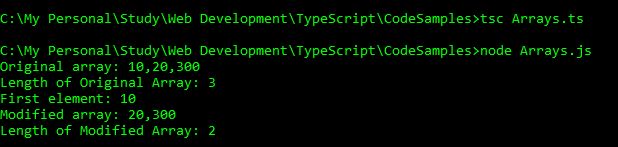
Below is the output of above code

slice

This method returns a new array extracted from the original array based on the beginIndex and endIndex.
– beginIndex: The index from where you want to start the extraction. If the is negative, You can extract only those elements from the end of the array. Do not put endIndex if beginIndex is negative.
– endIndex: The index till where you want to continue the extraction. The element at this index is not included in the new array. This is optional.
Syntax

array.slice(beginIndex [, endIndex]);

Below is a sample code

var orgArr:number[] = [10,20,30,40,50,60];
console.log("Original array: " + orgArr);
console.log("array.slice(0): " + orgArr.slice(0));
console.log("array.slice(1): " + orgArr.slice(1));
console.log("array.slice(0,2): " + orgArr.slice(0,2));
console.log("array.slice(1,2): " + orgArr.slice(1,2));
console.log("array.slice(1,3): " + orgArr.slice(1,3));
console.log("array.slice(-1,2): " + orgArr.slice(-1,2));
console.log("array.slice(-1): " + orgArr.slice(-1));
console.log("array.slice(-2): " + orgArr.slice(-2));
console.log("array.slice(-1,4): " + orgArr.slice(-1,4));

Below is the output of above code

some

This method tests whether some array element passes the test implemented by the function. This method is different from every() method where all the array elements have to pass the test.
– Returns true even if one array element passes in the function test. It will return false if all the array element fails in the function test.
– functionName is the function that tests the array elements
Syntax

array.some(functionName);

Below is an example

// returns true
function test1(element, index, array) { 
    return (element >= 10); 
 } 
 var nums1:number[] = [1,2,3];
 var result1 = nums1.some(test1); 
 console.log("Test Value : " + result1);
 
 // returns false
 function test2(element, index, array) { 
    return (element >= 10); 
 } 
 var nums2:number[] = [10,5,30,2];
 var result2 = nums2.some(test2); 
 console.log("Test Value : " + result2 );

Below is the output of above code

sort

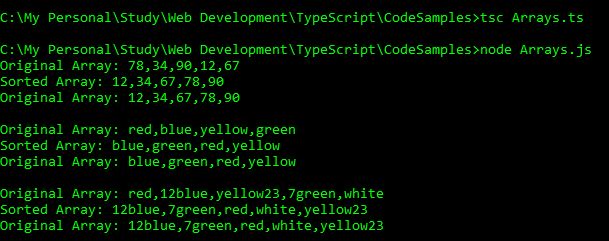
This method is used to sort the elements of the array based on a mentioned function. If the functionName is not specified, the array is sorted in lexicographically.
Syntax

array.sort(functionName);

Below is an example

var orgNumArr:number[] = [78,34,90,12,67];
console.log("Original Array: " + orgNumArr);
var newNumArr:number[] = orgNumArr.sort();
console.log("Sorted Array: " + newNumArr);
console.log("Original Array: " + orgNumArr);

var orgStrArr:string[] = ["red", "blue", "yellow", "green"];
console.log("\nOriginal Array: " + orgStrArr);
var newStrArr:string[] = orgStrArr.sort();
console.log("Sorted Array: " + newStrArr);
console.log("Original Array: " + orgStrArr);

var orgAlphaArr:string[] = ["red", "12blue", "yellow23", "7green","white"];
console.log("\nOriginal Array: " + orgAlphaArr);
var newAlphaArr:string[] = orgAlphaArr.sort();
console.log("Sorted Array: " + newAlphaArr);
console.log("Original Array: " + orgAlphaArr);

Below is the output of above code

splice

This method is used to add or remove array elements, hence modifying the array.
– index: index specifies the index from where we should start modifying the array.
– removeCount: this is used to mention the number of elements to be removed after the index. If you do not want to remove any element, specify 0.
– element1, element2,… : elements to be added in the array. This is optional. Mention the elements if you want to add the elements.
Syntax

array.splice(index, removeCount [element1, element2, ...]);

Below is an example

var orgArr:string[] = ["red", "blue", "yellow", "green","orange"];
console.log("Original Array: " + orgArr);
console.log("Original Length: " + orgArr.length);

console.log("\nAdding black at 3rd index and removing 0 elements.");
var element = orgArr.splice(3,0,"black");
console.log("Modified array: " + orgArr);
console.log("Removed element: " + element);
console.log("New Length: " + orgArr.length);

console.log("\nRemoving 1 element from 3rd index");
console.log("Array: " + orgArr);
var element = orgArr.splice(3,1);
console.log("Modified array: " + orgArr);
console.log("Removed element from 1st index: " + element);
console.log("New Length: " + orgArr.length);

console.log("\nRemove 2 elements from 2nd index then add white to 2nd index.");
console.log("Array: " + orgArr);
var element = orgArr.splice(2,2, "white");
console.log("Modified array: " + orgArr);
console.log("Removed element from 4th index: " + element);
console.log("New Length: " + orgArr.length);

Below is the output of above code

toString

Returns a string representing array and its elements.
Syntax

array.toString();

Below is an example

var orgArr:number[] = [10,20,30,40];
console.log("Original Array: " + orgArr);
console.log("typeOf of Original Array: " + typeof(orgArr));
var strArray = orgArr.toString();
console.log("String representation of array: " + strArray);
console.log("typeOf of Modified Array: " + typeof(strArray));
console.log("typeOf of Original Array: " + typeof(orgArr));

Below is the output of above code

unshift

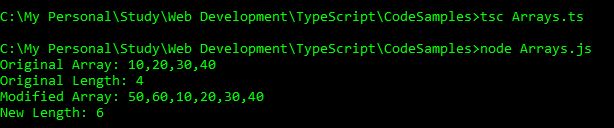
This method will add elements in the beginning of the array and returns the new length of the array,
Syntax

array.unshift(element1 [,element2, element3,...]);

Below is an example

var orgArr:number[] = [10,20,30,40];
console.log("Original Array: " + orgArr);
console.log("Original Length: " + orgArr.length);
var newLength = orgArr.unshift(50,60);
console.log("Modified Array: " + orgArr);
console.log("New Length: " + newLength);

Below is the output of above code

Methods in Arrays – Part 2

Arrays topic in TypeScript is divided into following parts:

Below are the methods that are discussed in this section

lastIndexOf map pop
push reduce reduceRight
lastIndexOf

This method returns the last index at which an element can be found. It will return -1 if the element is not found.
Returns the last index of the element.
element: this is the element that we are searching in the array
fromIndex: Index from which we need to start searching backwards. This is optional.
Syntax

arrayName.lastIndexOf(element, [fromIndex]);

Below is a sample code

var users:string[] = ["Akanksha","Anita", "Aarav","Apoorv","Anita","Raj"];
console.log("Original Array: " + users);
console.log(users.lastIndexOf("Anita"));
console.log(users.lastIndexOf("Anil"));

Below is the output of above code

map

This method creates a new array with the results of calling a function on every element in the array.
Syntax

arrayName.map(function);

Below is a sample code

var starter = [10,20,30];
function multiplyByFive (val, index, arr) {
    return val * 5;
}
var result = starter.map(multiplyByFive);
console.log(result);

Below is the output of above code

pop

This method removes the last element of the array and returns it.
Syntax

arrayName.pop();

Below is a sample code

var nums:number[] = [10,20,30];
console.log("Original array: " + nums);
console.log("Removing last element: " + nums.pop());
console.log("Modified array: " + nums);

Below is the output of above code

push

This method adds a new element at the end of the array and returns the length of the array.
Syntax

arrayName.push(element1, element2, .....);

Below is an example

var nums:number[] = [10,20,30];
console.log("Original array: " + nums);
console.log("New length of the array: " + nums.push(40,50));
console.log("Modified array: " + nums);

Below is the output of above code

reduce

This method applies a function simultaneously against two values of an array, from left to right, to reduce the array to a single value.
Syntax

array.reduce(function);

Below is an example

var nums:number[] = [10,20,3];
function multiply(a:number, b:number):number{
    return (a*b);
}
console.log(nums.reduce(multiply));

In the above example, it will first multiply 10 with 20. This will give 200. Then it will multiply 200 with 3, resulting in 600. That is, it will perform the operation in left to right direction.
Below is the output of above code

reduceRight

This method applies a function simultaneously against two values of an array, from right to left, to reduce the array to a single value.
Syntax

array.reduceRight(function);

Below is an example

var nums:number[] = [10,20,300];
function subtract(a:number, b:number):number{
    return (a-b);
}
console.log(nums.reduceRight(subtract));

In this example, first it will subtract 20 from 300, which will return 280. Then it will subtract 10 from 280, resulting in 270. That is, it will perform the operation in right to left direction.
Below is the output of above code

Methods in Arrays – Part 1

Arrays topic in TypeScript is divided into following parts:

Below are the methods that are discussed in this section

concat every filter
forEach indexOf join
concat

This contacts two or more arrays and returns a new array.
Syntax

array1.concat(array2, array3,...);

Below is a sample code

var nums:string[] = new Array("10","20","30");
var chars:string[] = new Array('a','b','c');
var strings:string[] = new Array("Hello","Hi");
var i:number;
var newArray = strings.concat(chars, nums);
for(i=0; i<newArray.length; i++){
    console.log(newArray[i]);
}

Below is the output of above code

every

This method tests whether all array elements passes the test implemented by the function.
Returns true is all the array elements passes in the function test, otherwise false.
functionName is the name of the function used to test the array elements
Syntax

arrayName.every(functionName);

Below is a sample code

// returns true
function test1(element, index, array) { 
    return (element >= 10); 
 } 
 var nums1:number[] = [10,20,30];
 var result1 = nums1.every(test1); 
 console.log("Test Value : " + result1);

 // returns false
 function test2(element, index, array) { 
    return (element > 10); 
 } 
 var nums2:number[] = [10,5,30];
 var result2 = nums2.every(test2); 
 console.log("Test Value : " + result2 );

Below is the output of above code

filter

This function will create a new array with the elements that passes a test implemented by a function.
Returns a new array
functionName is the name of the function used to test the array elements
Syntax

arrayName.filter(functionName);

Below is a sample code

function even(element, index, array) { 
    return (element%2 == 0); 
 } 
 var nums1:number[] = [5,10,20,30,105,64];
 var result1 = nums1.filter(even); 
 console.log("Even Numbers: " + result1);

Below is the output of above code

forEach

This method calls a function for each element in the array.
Syntax

arrayName.forEach(funcionName)

Below is an example

let users = ["Akanksha","Aarav","Anita","Raj"];
users.forEach(function(value){
    console.log(value);
});

Below is the output of above code

indexOf

This method will return the first index in which the element is found. It will return -1 if the element is not found.
Returns the first index in which the element is found. It only returns one index even if the value is present at multiple indexes
value: the value which we are looking in the array
fromIndex: the index from which we want to start the search. This is optional. By default, it will start the search from the beginning of the array.
Syntax

arrayName.indexOf(value, [fromIndex[);

Below is an example

var nums:number[] = [10,20,30,20,40,50,10];
console.log("Original array: " + nums);
console.log("Search for value 20: " + nums.indexOf(20));
console.log("Search for value 20, search start from 2nd index: " + nums.indexOf(20,2));
console.log("Search for 50: " + nums.indexOf(50));

Below is the output of above code

join

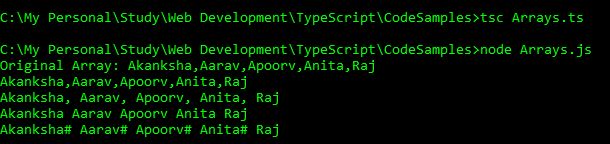
This method joins all the array elements into a string. We can pass a custom separator which can be used to separate the array values in the string. By default, it will use comma (,) as a separator.
Syntax

arrayName.join(separator);

Below is an example

var users:string[] = ["Akanksha","Aarav","Apoorv","Anita","Raj"];
console.log("Original Array: " + users);
console.log(users.join());
console.log(users.join(", "));
console.log(users.join(" "));
console.log(users.join("# "));

Below is the output of above code

Array Objects

Arrays topic in TypeScript is divided into following parts:

Array Objects

We can use Array object to create arrays. We can use Array constructor to pass array values. We can pass values in two ways:
– If we pass a numeric value to the constructor, it represents the size of the array
– Multiple values separated by comma represents the elements of the array
Syntax

var arrayName:dataType = new Array();

Below is an example, where we declare an Array object, assign values to it and then retrieve those values. You can use for loop as well to assign value to array.

var num:number[] = new Array(3);
var i:number;
num[0] = 10;
num[1] = 20;
num[2] = 30;
for(i=0;i<num.length;i++){
    console.log(num[i]);
}

Below is the output of above code

Let’s pass element values to Array Constructor.
Below is an example

var num:number[] = new Array(10,20,30);
var i:number;
for(i=0;i<num.length;i++){
    console.log(num[i]);
}

Below is the output of above code

Introduction to Arrays in TypeScript

Arrays topic in TypeScript is divided into following parts:

Introduction to Arrays
  • When we store a value, we declare a variable and assign the value to that variable. This variable takes a random place in the memory. But if we want to store 100 values of same type, like userNames, we have to declare 100 variables which will take 100 random places in memory. Hence using variables in this scenario is not feasible.
  • We use Arrays for this scenario. An Array is a collection of values of same data type.
  • Arrays are allocated sequential block of memory. Each memory block represents an array element.
  • We cannot resize the arrays once they are initialized.
  • We access array elements using an index. Array index starts with 0(zero). That means, first element of array is stored at the index 0.
  • Arrays should be declared before they are used. Variable name of arrays follow the rules for declaring a variable.
  • We can update an array element’s value, but we cannot delete it.
  • Array population means initializing the array elements with the values.
  • If you do not provide the data type to array variable, it will take any data type.
Declaring and Initializing an Array

Syntax

// Declare and initialize Array in different statements
var arrayVariable:dataType[];
arrayVariable = [value1, value2, value3,...];

// Declare and initialize Array in one statements
var arrayVariable:dataType[] = [value1, value2, value3,...];

Below is a an example

// Declare Array and then initialize it
var users:string[];
users = ["Akanksha","Aarav","Anita","Raj"];

// Declare Array and initialize it in the same line.
var users1:string[] = ["Akanksha","Aarav","Anita","Raj"];
Accessing Array Elements

Array elements are accessed using indexes. Index for array starts with 0. We can use loops as well to access the array elements.
Syntax

arrayVariable[index];

Below is an example

var values:number[] = [10,20,30,40,50];
console.log(values[0]);
console.log(values[1]);
console.log(values[2]);
console.log(values[3]);
console.log(values[4]);

Below is the output of above code

Using for loop to access Array elements
Below is an example

var values:number[] = [10,20,30,40,50];
var i:number;
for(i=0; i&lt;values.length; i++){
    console.log(values[i]);
}

Below is the output of above code

Using for…in loop to access Array elements
Below is the sample code

var values:number[] = [10,20,30,40,50];
var val:any; // make sure this data type is any
for(val in values){
    console.log(values[val]);
}

Below is the output of above code

Strings in TypeScript – Part 3

Strings in TypeScript is divided in three parts:

This section has the details of following methods:

toLocaleLowerCase toLocaleUpperCase toLowerCase
toUpperCase toString valueOf
toLocaleLowerCase()

This method will convert all the characters of a string in lower case representing the current locale.
Syntax

string.toLocaleLowerCase();

Below is a sample code

var str1 = new String("I like to eat MANGOES, WHICH are YELLOW in color");
console.log("Original String: " + str1);
console.log("Lower-case String: " + str1.toLocaleLowerCase());

Below is the output of above code

toLocaleUpperCase()

This method will convert all the characters of a string in upper case representing the current locale.
Syntax

string.toLocaleUpperCase();

Below is a sample code

var str1 = new String("I like to eat MANGOES, WHICH are YELLOW in color");
console.log("Original String: " + str1);
console.log("Upper-case String: " + str1.toLocaleUpperCase());

Below is the output of above code

toLowerCase()

This method will convert all the characters of a string in lower case.
Syntax

string.toLowerCase();

Below is a sample code

var str1 = new String("I like to eat MANGOES, WHICH are YELLOW in color");
console.log("Original String: " + str1);
console.log("Lower-case String: " + str1.toLowerCase());

Below is the output of above code

toUpperCase()

This method will convert all the characters of a string in upper case.
Syntax

string.toUpperCase();

Below is a sample code

var str1 = new String("I like to eat MANGOES, WHICH are YELLOW in color");
console.log("Original String: " + str1);
console.log("Upper-case String: " + str1.toUpperCase());

Below is the output of above code

toString()

This method returns the string representing the specified object. You can perform all the string operations on this converted object.
Syntax

object.toString();

Below is a sample code

var str1 = "I like to eat MANGOES, WHICH are YELLOW in color";
console.log("Original String: " + str1);
console.log(str1.toString());

Below is the output of above code

valueOf()

This method returns the primitive value of the String Object.
Syntax

string.valueOf();

Below is a sample code

var str1 = "I like to eat MANGOES, WHICH are YELLOW in color";
console.log("Original String: " + str1);
console.log(str1.valueOf());

Below is the output of above code

Strings in TypeScript – Part 2

Strings in TypeScript is divided in three parts:

This section has the details of following methods:

subString subStr split
slice search replace
match localeCompare lastIndexOf
lastIndexOf()

This method returns the last index of a specified value within a string. Search will start from the starting of the string. variable is the string in which we are searching for the value.
searchString is the value which we are searching in the variable.
fromIndex is an integer which specify the starting index for the search. It will return -1 if the string is not found.
Syntax

variable.lastIndexOf(searchString, [fromIndex])

Below is a sample code

var str1 = new String("This is a sample string sample");
console.log("Last Index of i: " + str1.lastIndexOf('i'));
console.log("Last Index of is: " + str1.lastIndexOf("is"));
console.log("Last Index of sample: " + str1.lastIndexOf("sample"));
console.log("Last Index of sample: " + str1.lastIndexOf("sample", 14));
console.log("Last Index of two: " + str1.lastIndexOf("two"));

Below is the output of above code

localeCompare()

This method will return an integer value after sorting two strings
Syntax

str1.localeCompare(str2);

– Returns 0 if str1 and str2 are equal.
– Returns 1 if str2 comes before str1 in the locale sort order.
– Returns -1 if str2 comes after str1 in locale sort order.

Below is an example

var str1 = new String("ab");
var str2 = new String("cd");    
var index1 = str1.localeCompare("ab");  
var index2 = str2.localeCompare("ab");  
var index3 = str1.localeCompare("cd"); 
console.log("Perfect Match: " + index1 );
console.log("Parameter value comes before the string value: " + index2 );
console.log("Parameter value comes after the string value: " + index3 );

Below is the output of above code

match()

This method searches a string for a match against a regular expression. This will return an array of all matches. Include g modifier to do a global search, that is in complete string. Otherwise it will return only the first match in the string. i is used to match without case-comparison. This method will return null if no match is found.
Syntax

variable.match(regexpre);

Below is an example

var str1 = new String("This is an example. ThiS IS good.");
console.log(str1.match(/is/g));
console.log(str1.match(/is/gi));

Below is the output of above code

replace

This method first finds a match between a regular expression and a string, then replaces the matched substring with another substring.
Syntax

variable.replace(regexp, substring);

Below is a sample code

var str1 = new String("I like to eat mangoes, but mangoes only come in summers. Mangoes are yellow in color.");
var result = str1.replace(/mangoes/gi,"apples");
console.log(result);

Below is the output of above code

This method searches a substring, using a regular expression, within a string and returns the index.
If the regular expression is not inside the string, it will return -1.
Syntax

string.search(regexp);

Below is a sample code

var str1 = new String("I like to eat mangoes, but mangoes only come in summers. Mangoes are yellow in color.");
var index = str1.search(/mangoes/gi);
console.log("First index of mangoes: " + index);

Below is the output of above code

slice()

This method extracts a section of a string and returns a new string. You can remove characters from beginning as well as from the end of the string. Giving the value fromEnd is optional.
Syntax

string.slice(fromBeginning, [fromEnd]);

Below is an example

var str1 = new String("I like to eat mangoes, but mangoes only come in summers.");
console.log(str1.slice(4,-5));

Below is the output of above code

split

This will split a string into array based on a substring. This method returns an array.
separator is the substring used to split a string.
limitOfValues is an integer value that tells how many values to return.
Syntax

string.spli(separator, [limitOfValues])

Below is an example

var str1 = new String("red,orange,blue,black,yellow,green");
var colors = str1.split(',');
var i:number;
console.log("All color values");
for(i=0; i<colors.length; i++)
{
    console.log(colors[i]);
}
var colors1 = str1.split(',',3);
var i:number;
console.log("\nOnly 3 color values");
for(i=0; i&lt;colors1.length; i++)
{
    console.log(colors1[i]);
}

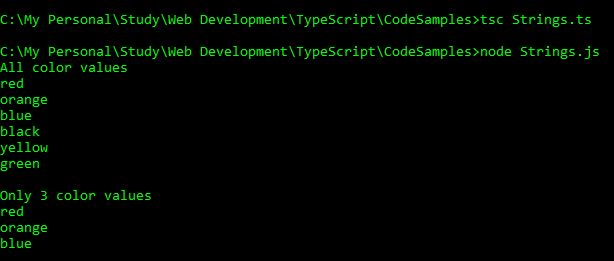
Below is the output of above code

substr()

This method will return a new string.
startIndex represents the index from where we want to start extracting the substring.
length is a number representing the number of characters we want to extract. This is optional.
Syntax

string.substr(startIndex, [length]);

Below is a an example

var str1 = new String("I like to eat mangoes, which are yellow in color");
console.log("Original String: " + str1);
console.log("(0): " + str1.substr(0));
console.log("(4): " + str1.substr(4));
console.log("(5,9): " + str1.substr(5,9));
console.log("(-2): " + str1.substr(-2));
console.log("(-5,4):" + str1.substr(-5,4));

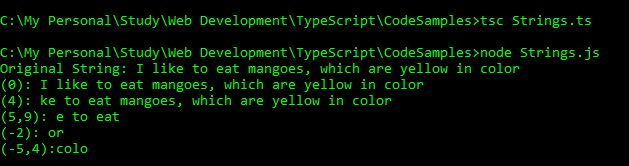
Below is the output of above code

substring()

This method will return a new string between two indexes. It does not take negative values like we used in substr() method, hence we cannot start extraction from the end of the string.
startIndex is the starting index from where the extraction should begin
endIndex is the index where the extraction should end. This is optional.
Syntax

string.substring(startIndex,[endIndex]);

Below is an example

var str1 = new String("I like to eat mangoes, which are yellow in color");
console.log("Original String: " + str1);
console.log("(0): " + str1.substring(0));
console.log("(4): " + str1.substring(4));
console.log("(5,9): " + str1.substring(5,9));
console.log("(-2): " + str1.substring(-2));
console.log("(-5,4): " + str1.substring(-5,4));

Below is the output of the above code

Strings in TypeScript – Part 1

I am dividing Strings in three parts.

  • Part 1. This is Part 1
  • Part 2
  • Part 3
  • This section has the details of following topics:

    constructor length prototype
    charAt concat indexOf

    In simple terms, Strings is a collection of characters. We can create an object of String class and perform many functions on it.
    Syntax for creating a new String object and assigning value to it.

    var variableName = new String(value);
    
    String Constructor: String()

    It is used to create an object of String type. We can also assign an initial value to that String object.
    Below is an example of creating a String object, assigning a string value to it using a constructor and fetching that value.

    var str=new String("Hello");
    console.log(str.valueOf());
    

    Below is the output of above code

    length

    Returns the length of the string. Counts the white spaces as well. This will return the number.
    Syntax

    variable.Length
    

    Below is a sample code

    var str = new String("Hello World!!");
    console.log("Length of String: " + str.length);
    

    Below is the output of above code
    charAt()

    This method will return the character at a specified index. The index starts with 0(zero) and the index of the last character is string.length – 1. Index which is out of range returns nothing, not even undefined.
    Syntax

    variable.charAt(index);
    

    Below is a sample code

    var str = new String("Hello World!!");
    console.log("1st Character: " + str.charAt(0));
    console.log("3rd character: " + str.charAt(2));
    console.log("6th Character, which is space: " + str.charAt(5));
    console.log("7th character: " + str.charAt(6));
    console.log("Index which is out of range: " + str.charAt(13));
    

    Below is the output of above code
    concat()

    This method merges two or more strings into a one single string.
    Syntax

    string1.concat(string2, string3, ....);
    

    Below is a sample code

    var var1:string = "Hello ";
    var var2:string = "Friends!! ";
    var var3:string = "Good Morning.";
    var result = var1.concat(var2);
    var result1 = var1.concat(var2,var3);
    console.log("var1 + var2: " + result);
    console.log("var1 + var2 + var3: " + result1);
    

    Below is the output of above code

    indexOf

    This method returns the index of a specified value within a string. Search will start from the starting of the string. variable is the string in which we are searching for the value. searchString is the value which we are searching in the variable. fromIndex is an integer which specify the starting index for the search. It will return -1 if the string is not found.
    Syntax

    variable.indexOf(searchString, [fromIndex])
    

    Below is an example

    var str1 = new String("This is a sample string sample");
    console.log("Index of i: " + str1.indexOf('i'));
    console.log("Index of s: " + str1.indexOf('s', 8));
    console.log("Index of is: " + str1.indexOf("is"));
    console.log("Index of sample: " + str1.indexOf("sample"));
    console.log("Index of sample: " + str1.indexOf("sample", 14));
    

    Below is the output of above code
Power Platform Academy

Start or Upgrade your Career with Power Platform

Learn with Akanksha

Python | Azure | AI/ML | OpenAI | MLOps
Design a site like this with WordPress.com
Get started