Number Object Methods in TypeScript

The Number object have only the default methods that are present in any other object. Properties of Number object are explained in another article.
Below are some of the commonly used methods:
valueOf()
toString()
toPrecision()
toLocaleString()
toFixed()
toExponential()

toExponential()

This methods returns the exponential notation of the Number object in the string data type.
Syntax:

numberVariable.toExponential(numberOfDecimals?:number)

The parameter in this method is a number which specifies the number of decimal digits after decimal point. It is optional.
Below is an example:

var num1=123.456789;
var result=num1.toExponential();
console.log(result);
var result1=num1.toExponential(2);
console.log(result1);

Below is the output of above code:

toFixed()

This function is used to fix the the decimal digit in a fractional number. We pass the number of digits we want after decimal point as the parameter.
Syntax:

numberVariable.toFixed(numberOfDecimals?:number)

Below is an example:

var num1=123.4567;
console.log(num1.toFixed());
console.log(num1.toFixed(1));
console.log(num1.toFixed(5));

Below is the output of above code:

toLocaleString()

This method converts a number object into a human readable string representing the number using the locale of the environment.
Syntax:

numberVariable.toLocaleString();

Below is an example:

var num1=123.456;
var str=num1.toLocaleString();
console.log(num1.toLocaleString());
console.log("typeof str: " + typeof(str));

Below is the output of above code

toPrecision()

This method returns a string representing the number of digits to the mentioned precision. Parameter takes the number of digits for the precision and is optional.
Syntax

numberVariable.toPrecision(precisionNumber?:number)

Below is an example:

var num=12.3456;
console.log(num.toPrecision());
console.log(num.toPrecision(2));
console.log(num.toPrecision(4));
var str=num.toPrecision(2);
console.log(typeof(str));

Below is the output of above code

toString()

This method will convert a object into a string type. We can then use String methods on this object.
Syntax:

variable.toString()

Below is an example

var num=1234;
console.log(num.toString());
console.log(typeof(num.toString()));

Below is the output of above code:

valueOf()

Returns the primitive value of an object. This can be any object, number, string etc.
Syntax:

variable.valueOf();

Below is an example:

var num = new Number(100); 
console.log(num.valueOf());
var str = new String("Hello World!!"); 
console.log(str.valueOf());

Below is the output of above code:

Properties of Number object in TypeScript

We use Number class to perform actions on numbers or access their properties. Methods for Number object are explained in another article.
Syntax:

var variableName = new Number(value)

In case as non-numeric value is passed to the constructor, it will return NaN(Not-a-Number).
Below is a list of properties of of Number class:

Property Name Description Example
MAX_VALUE This represents the maximum value a Numeric variable can hold Number.MAX_VALUE
MIN_VALUE This represents the minimum value a Numeric variable can hold Number.MIN_VALUE
NaN This represents a value that is not a number Number.NaN
NEGATIVE_INFINITY This represents the value that is less than Minimum value Number.NEGATIVE_INFINITY
POSITIVE_INFINITY This represents a value that is more than Maximum value Number.POSITIVE_INFINITY

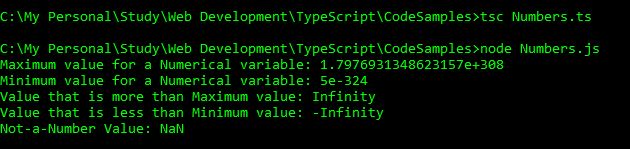
Below is a code to get the above values.

var num=new Number();
console.log("Maximum value for a Numerical variable: " + Number.MAX_VALUE);
console.log("Minimum value for a Numerical variable: " + Number.MIN_VALUE);
console.log("Value that is more than Maximum value: " + Number.POSITIVE_INFINITY);
console.log("Value that is less than Minimum value: " + Number.NEGATIVE_INFINITY);
console.log("Not-a-Number Value: " + Number.NaN);

Below is the output of above code:

prototype in TypeScript

  • It is a static property of the number object.
  • It is used to assign a new properties and methods to an object in the current code.

Below is an example:

    function contact(name:string, phone:number){
        this.name=name;
        this.phone=phone;
    }
    var user1=new contact("Akanksha",9876543210);
    contact.prototype.address="Delhi";
    console.log("Name: " + user1.name);
    console.log("Phone: " + user1.phone);
    console.log("Address: " + user1.address);

Below is the output of above code:

Function Overload in TypeScript

  • We can have a function with same name, but different parameters and different functionality. This is known as Function Overload.
  • We can first declare the functions and then define it.
  • If they differ on the number of parameters, we can mark the parameters as optional during function definition.
  • Please note that this function overloading is different from C# function overloading. There we used to have many function definitions with one function name; but here, we have only one function definition.
  • Based on our inputs, your code will choose which function to invoke.
  • We can differentiate our functions based on
    • Data Types of the parameters
    • Number of Parameters
    • Sequence of Parameters

Below is a sample code

function addition(num1:number, num2:number):void;
function addition(str1:string,str2:string):void;

function addition(a:any, b:any):void{
    console.log(a+b);
}

addition("Hello", " Friends");
addition(10,20);

Below is the output of above code:

Other Related Articles

Functions in TypeScript
Parameterized Functions – Part 1
Parameterized Functions – Part 2

Parameterized Function – Part 2

Let’s continue Part 1 of Parameterized Functions.

Recursion Functions
  • Recursion functions are those functions that call themselves repeatedly using different parameters.
  • They generally call themselves repeatedly using loops until they reach a certain break-point/result.
    Below is an example. This is a very famous example of recursion.
var n:number = 8;
console.log("Factorial of " + n + " is " + factorial(n));
function factorial(num:number){
    if(num<=0){
        return 1;
    }
    else{
        return (num * factorial(num-1));
    }
}

Below is the output of above code:

Anonymous Functions
  • These functions do not have name and cannot be reused.
  • They function as normal functions like taking parameters and returning value.
    Below is an example:
var sum=function(num1:number, num2:number){
    return (num1+num2);
}
console.log("Sum is: " + sum(10,20));

Below is the output of above code. You can also print the value inside the function as well.

Lambda Functions
  • They are like anonymous functions in TypeScript. They are called as Arrow Functions.
  • We can pass parameters in these function and also write function’s statements in this, the way we wrote for other functions.
  • The only difference is the Lambda Notation(=>).
  • We generally use a single character to declare function parameters.

Lambda Expression
It is a one liner code which acts as a function.

Syntax for Lambda Expression:

(parameter1, parameter2,..) => function statements

Below is an example:

var n2:number = 20;
var sum=(n1:number, n3:number) => n2 + n1 + n3;
console.log("Sum is: " + sum(10,30));

Below is the output of above code:
Lambda Statement
It points to a block of code.
Below is the syntax for Lambda Statement:

(parameter1, parameter2,..) => {
    function statements
}

Below is an example:

var n2:number = 20;
var add=(n1:number, n3:number) => {
    var sum = n2 + n1 + n3;
    console.log("Sum is: " + sum);
}
add(100,30);

Below is the output of above code:

Function Constructor
  • We can also define a function using JavaScript’s build in constructor called Function().
    It’s syntax:
var result = new Function(parameter1, parameter2,....)

Below is an example:

var add = new Function("num1", "num2", " return (num1 + num2)" );
var sum=add(10,20);
console.log("Sum is: " + sum);

Below is the output of above code:

Parameterized Function – Part 1

We have already seen what are functions in TypeScript. Let’s see what are parameterized functions.
This is Part 1 of Parameterized Function’s section. Part 2 is in another post.

It is not necessary to mention the data type of the parameters. If you do not mention the data type, it will take any as their data type. Below is an example of a parameterized function which takes two numbers as parameters, adds them and returns the sum of those two numbers.

var num1:number=10;
var num2:number=20;
hello();
function hello(){
console.log("Hellozz");
var sum=add(num1,num2);
console.log(num1 + " + " + num2 + " = " + sum);
}
function add(n1:number, n2:number):number{
return (n1+n2);
}

Below is the output of above code:

Optional Parameters

Optional Parameters are not compulsory to pass at the time of function invocation. They are marked by a question mark and should be declared at the end of the parameter list.
Below is an example of optional parameters:

var num1:number=10;
var num2:number=20;
var num3:number=40; 
hello();
function hello(){
    console.log("Hellozz");
    var sum=add(num1,num2);
    console.log(num1 + " + " + num2 + " = " + sum);
    var sum1=add(10,20,30);
    console.log(num1 + " + " + num2 + " + " + num3 + " = " + sum1 );
}
function add(n1:number, n2:number, n3?:number):number{
    if(n3==undefined){
        return (n1+n2);
    }
    else if(n3!=undefined){
        return(n1+n2+n3);
    }

}

Below is the output of above code:

Rest Parameters

We can pass multiple parameters to a function using rest parameters, but they should of the same type. To declare a rest parameter, parameter name is prefixed with three dots.
Below is an example of rest parameters:

hello();
function hello(){
    console.log("Hellozz");
    console.log(add(10,10,10,10));
    console.log(add(100,200));
}
function add(...values:number[]):number{
    var i:number;
    var sum:number=0;
    for(i=0; i<values.length;i++){
        sum+=values[i];
    }
    return sum;
}

Below is the output of above code:

Default Parameters

Sometimes we assign a default value to parameters, until explicitly specified. That is, if you do not pass any value to that parameter, it will automatically take the default value.
Below is an example:

empDetails("Akanksha");
empDetails("Aarav","HR");

function empDetails(name:string, department:string="IT"){
    console.log("Employee Name: " + name + "; Department: " + department);
}

Below is the output of above code:

Functions in TypeScript

  • Functions are a set of statements that we can reuse multiple times at different places within our project.
  • Functions perform a specific task, which can be simple as well as complex.
  • Statements within a function are not executed on their own until the function is called. This process is known as function invocation.
  • We can divide our program into functions which makes the program readable and help in maintaining it.
  • We have to specify the name of the function (which follows the rules of identifier), return type and parameters (if any).

Below is the syntax of the function:

function functionName(){
   /* Function Definition
      Statements or code that will be executed 
      when this function is called */
}

For example:

function hello(){
    console.log("Inside hello function");
}
Function Invocation
hello(); //function invocation

// writing a function
function hello(){
    // function definition
    console.log("Inside hello function");
}

Below is the output of above code:

Function returning a value
  • In above examples, we are just displaying the message.
  • There can be a requirement when we want to return something from a function to use it somewhere else, say want to perform an operation and return the result.
  • The return data type can be any data type, but it should match the data type of that value that you are returning from the function.
  • Function should end with a return statement. As soon as the control of the function encounters a return statement, it will execute that return statement and the control goes back to the statement from the function was initially invoked. It will not execute the statements after that return.
  • There can only be one return value, however there can be multiple return statements. For example, if there is a statement with if…else statement, we can put return statement in both if and else.
  • We can invoke a function from another function.
    Below is the syntax:
function functionName():returnDataType{
    // Statements
       return value;
}

In below example, we are defining two functions, hello (which does not return a value) and add (which returns the sum of two numbers). add() function in invoked from another function, hello().

hello(); //function invocation

// writing a function
function hello(){
    // function definition
    console.log("Inside hello function");
    var sum=add(); //another function is called from a function
    console.log("Sum is: " + sum);
}

function add():number{
    var num1:number=10;
    var num2:number=20;
    return (num1+num2);
}

Below is the output of above code:

Loops in TypeScript

Loops are used to execute certain set of statements n number of times.

There are three types of loops in TypeScript: for loop, while loop and do-while loop.

for loop

for loop is used when we know the number of times we want to execute a set of statements.
Below is a sample code:

var i:number;
for(i=1; i<=10; i++){
    console.log(i);
}

Below is the output of above code:

while loop

while loop is used when we are not sure how many number of times we want to execute a set of statements.
Below is a sample code:

var num:number=30;
while(num>0 && num%3==0){
    console.log(num/3);
    num-=3;
}

Below is the output of above code:

do-while loop

do-while loop is just like while loop. The only difference is if the condition is false, while loop will not be executed even once, do-while will be executed at least once.
Below is a sample code:

var num:number=30;
do{
    console.log("Do-While loop will be executed at least once even if the condition is false!");
}while(num>40)

Below is the output of above code:

Conditional Statements in TypeScript – switch

Conditional Statements are used to make decisions in the code and execute a set of statements accordingly. If a condition is true, one set of statements is executed. If the condition is false, no or another set of statements is executed.

There are two types of conditional statements: if and switch. In this article, we will discuss about switch statement.

Basic Syntax of switch statement is:

switch(variable) { 
   case constant1: { 
      //statements; 
      break; //breaks the flow of the execution
   } 
   case constant2: { 
      //statements; 
      break; 
   } 
   default: { //optional
      //statements; 
      break; 
   } 
} 
  • We test the cases against a defined value. Whichever case matches the value, that case is executed.
  • We put break statement to stop the execution of code after that case.
  • default is used when the defined value does not matches any case. This is optional.
  • There can be any number of cases in switch statements.
  • Cases should have unique constants to match the variable of Switch.
  • Data Type of Switch variable and case constant should be same.
  • Case contacts should only be constants. They should not be expressions or variable.

Below is an example when the defined value matched one of the case.

var weeknum:number = 4;
switch(weeknum){
    case 1:
        console.log("Sunday");
        break;
    case 2:
        console.log("Monday");
        break;
    case 3:
        console.log("Tuesday");
        break;
    case 4:
        console.log("Wednesday");
        break;
    case 5:
        console.log("Thursday");
        break;
    case 6:
        console.log("Friday");
        break;
    case 7:
        console.log("Saturday");
        break;
    default:
        console.log("Invalid Value");

}

Below is the output of above code.

Below is an example for default statement.

var weeknum:number = 9;
switch(weeknum){
    case 1:
        console.log("Sunday");
        break;
    case 2:
        console.log("Monday");
        break;
    case 3:
        console.log("Tuesday");
        break;
    case 4:
        console.log("Wednesday");
        break;
    case 5:
        console.log("Thursday");
        break;
    case 6:
        console.log("Friday");
        break;
    case 7:
        console.log("Saturday");
        break;
    default:
        console.log("Invalid Value");

}

Below is the output of above code:

 

Conditional Statements in TypeScript – if…else

Conditional Statements are used to make decisions in the code and execute a set of statements accordingly. If a condition is true, one set of statements is executed. If the condition is false, no or another set of statements is executed.

There are two types of conditional statements: if and switch. In this article, we will be discussing various forms of if-statements.

if statement

Only if statement is included with a condition. If the result of this condition is true, a set of statements is executed. No else condition is present.
Below is an example when if condition returns false.

var num1:number = 100;
if(num1>200){
console.log("Inside if statement");
}
console.log("Outside if statement");

Below is the output of above code:

Below is an example when if condition returns true.

var num1:number = 100;
if(num1<200){
console.log("Inside if statement");
}
console.log("Outside if statement");

Below is the output of above code:

if…else statement

Here, when the condition is true, if block is executed. When the condition is false, else block is executed.
Below is the example when condition is true and if block is executed.

var num1:number = 100;
if(num1<200){
    console.log("Inside if, as condition is true");
}
else{   
    console.log("Inside else, as condition is false");
}

Below is the output of above code:

Below is the example when condition is false and else block is executed.

var num1:number = 100;
if(num1>200){
    console.log("Inside if, as condition is true");
}
else{   
    console.log("Inside else, as condition is false");
}

Below is the output of above code:

if…else if..else Statement

Below are some sample codes:

var num1:number = 100;
var num2:number = 200;
if(num1>num2){
    console.log(num1 + " is greater than " + num2);
}
else if(num1<num2){   
    console.log(num1 + " is less than " + num2);
}
else{
    console.log(num1 + " is equal to " + num2);
}

Below is the output of above code:

Another Example:

var num1:number = 100;
var num2:number = 100;
if(num1>num2){
    console.log(num1 + " is greater than " + num2);
}
else if(num1<num2){   
    console.log(num1 + " is less than " + num2);
}
else{
    console.log(num1 + " is equal to " + num2);
}

Below is the output of above code:

Nested If

We can nest if statements inside another if or else block. Below is an example related to this:

var num1:number = 100;
var num2:number = 200;
var num3:number = 100;
if(num1>num2){
    console.log(num1 + " is greater than " + num2);
}
else if(num1<num2){   
    console.log(num1 + " is less than " + num2);
    if(num1 == num3){
        console.log(num1 + " is equal to " + num3);
    }
    else{
        console.log(num1 + " is not equal to " + num3);
    }
}
else{
    console.log(num1 + " is equal to " + num2);
}

Below is the output of above code:

Power Platform Academy

Start or Upgrade your Career with Power Platform

Learn with Akanksha

Python | Azure | AI/ML | OpenAI | MLOps

Design a site like this with WordPress.com
Get started
