Inheritance in TypeScript

  • Inheritance is a concept in which we reuse the properties and methods of another class or interface, hence no need to rewrite the code again and again.
  • We use extend keyword to inherit other interfaces and classes.
  • We use an existing class to create a new class.
  • The class that is used to create the new class is called as parent class/super class. The newly created class is called as child class/sub class.
  • Child class inherits all the fields and methods from the parent class except the private fields and constructor.
  • Inheritance with Interface is explained in another article.

Syntax

class childClass extends parentClass{}

Below is an example of class inheritance

class Vehicle{
    model:string;
    color:string;
}
class Car extends Vehicle{
    fuelType:string;
}

class Maruti extends Car{
    customername:string;
    purchasedOn:string;
    
    constructor(custName:string, date:string, ){
        super();
        this.customername = custName;
        this.purchasedOn = date;   
    }
    purchaseDetails():void {
        console.log(this.customername + " purchased a car on " + this.purchasedOn);
        console.log("Model of the car: " + this.model+ "; Color: " + this.color + "; Fuel Type: " + this.fuelType);
    }
}
var car = new Maruti("Akanksha","28th Dec, 2018");
car.model = "Maruti Suzuki Dzire"
car.fuelType = "Diesel";
car.color = "Silver";
car.purchaseDetails();

Below is the output of above code

Other Related Articles

Classes in TypeScript
Interfaces and Classes in TypeScript
Interfaces in TypeScript
Access Modifiers
Method Overriding

Interface and Classes in TypeScript

Let’s implement Interfaces to Class.
Below is an example

interface IVehicle{
    model:string;
    color:string;
}
interface ICar extends IVehicle{
    fuelType:string;
}

class Car implements ICar{
    customername:string;
    purchasedOn:string;
    mycar1:ICar;
    model:string;
    color:string;
    fuelType:string;
    
    constructor(custName:string, date:string, car1:ICar){
        this.customername = custName;
        this.purchasedOn = date;   
        this.mycar1 = car1;
    }
    purchaseDetails():void {
        console.log(this.customername + " purchased a car on " + this.purchasedOn);
        console.log("Model of the car: " + this.mycar1.model+ "; Color: " + this.mycar1.color + "; Fuel Type: " + this.mycar1.fuelType);
        // Below line of code will only return undefined
        //console.log("Model of the car: " + this.model+ "; Color: " + this.color + "; Fuel Type: " + this.fuelType);
    }
}
var carDetails:ICar = {model:"Hyundai Creta", color:"White", fuelType:"Petrol"};
var car = new Car("Akanksha","28th Dec, 2018", carDetails);
car.purchaseDetails();

Below is the output of above code

Other Related Articles

Interfaces in TypeScript
Classes in TypeScript
Inheritance in TypeScript

Classes in TypeScript

  • TypeScript is an Object Oriented Language and hence we can create classes, interfaces, objects etc. in TypeScript.
  • We can create objects of the classes, hence classes encapsulates the data for the object.
  • We use class keyword to create classes in TypeScript.
  • Class name follows the rules same as variables.
  • Class definition includes:
    • Fields: A field is a variable declared in a class. They represents the properties of the object creates using the class. These fields can only be used by the objects of that class and their scope is limited to that class only.
    • Constructors: Constructors are used to allocate memory for the objects of the class. We can also use constructors to assign values to the fields of the object. Please note that we can define only one constructor in a class, multiple constructor declaration is not allowed. A constructor is a function which can be parameterized.
    • Functions: These are the operations or actions that an object can perform. They are also referred as methods.
  • We do not use var keyword to declare fields in a class.
  • this keyword refers to the current instance of the class. If the field name and constructor’s parameter names are same, we can use this keyword with fields to remove the ambiguity.
  • We use new keyword to create an object of the class.
    • Syntax: var objectName = new ClassName();
  • In above piece of code, ClassName() invokes the constructor of the class. If the constructor has parameters, we can pass the value of those parameters from here. For example: var objectName = new ClassName(value1, value2,….);
  • We access the field and methods of the class using the object followed by dot(.). For example,
    • to access field: objectName.field1;
    • to access function: objectName.functionName(parameterValue1, parameterValue2,…);

Syntax for creating class

class className{
  // class fields and methods
}

Below is an example, where we create a class, define fields, constructor and function. We then create an object of this class, initialize the fields and then invoke the function.

class Car{
    customername:string;
    purchasedOn:string;

    constructor(custName:string, date:string){
        this.customername = custName;
        this.purchasedOn = date;
    }
    purchaseDetails():void {
        console.log(this.customername + " purchased a car on " + this.purchasedOn);
    }
}
var car = new Car("Akanksha","28th Dec, 2018");
car.purchaseDetails();

Below is the output of above code

Other Related Articles

Interfaces in TypeScript
Interface and Classes in TypeScript
Inheritance in TypeScript
static keyword
instanceof Operator
Access Modifiers

Interfaces in TypeScript

  • An INTERFACE provides a structure which defines properties and methods, which an entity must adhere to.
  • Interface contains only declaration part. The definition is provided by the deriving class/object.
  • The deriving class/object is responsible to provide the definition of all the members and methods that are declared in interface.
  • If the deriving class/object fails to do so, an error is displayed stating that a particular property or method is missing.
  • You can use an interface multiple times and with multiple values.

Below is an example of declaring an interface and creating an object for it.

interface IVehicle{
    // These are the two properties declared
    model:string; 
    color:string;
    allocationDetails:()=>any; // This is the method declaration, returning any data type
}
var car:IVehicle = {
    // Defining the two properties and a method of interface
    model:"Hyundai Creta",
    color:"White",
    allocationDetails: ():string =>{
        return "New car is allocated.";
    }
}
console.log("Model of the car: " + car.model);
console.log("Color of the car: " + car.color);
console.log(car.allocationDetails());

Below is the output of above code

Interface and Union

We can use Union in Interfaces to define properties and methods.
Below is a sample code to illustrate the same

interface IVehicle{
    model:string; 
    color:string;
    allocationDetails:string|string[]|(()=>string);
}

console.log("Invoking as String!");
var car1:IVehicle = {
    model:"Hyundai Creta",
    color:"White",
    allocationDetails:"New car is allocated."
}
console.log("Model of the car: " + car1.model);
console.log("Color of the car: " + car1.color);
console.log("Allotment Details: " + car1.allocationDetails);

console.log("\nInvoking as Array!");
var car2:IVehicle = {
    model:"Hyundai Creta",
    color:"White",
    allocationDetails: ["Alloted to Akanksha","She lives in Delhi"]
}
console.log("Model of the car: " + car2.model);
console.log("Color of the car: " + car2.color);
console.log("Allotment Details: " + car2.allocationDetails);

console.log("\nInvoking as Function!");
var car3:IVehicle = {
    model:"Hyundai Creta",
    color:"White",
    allocationDetails:()=>{
        return "New car is allocated.";
    }
}
console.log("Model of the car: " + car3.model);
console.log("Color of the car: " + car3.color);
var allocation:any = car3.allocationDetails;
console.log(allocation());

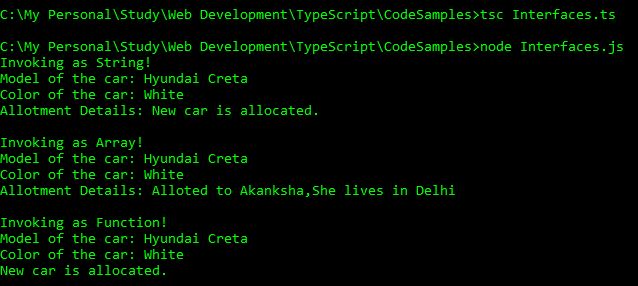
Below is the output of above code

Interface and Array

We can use arrays to define the parameters in an Interface.
Below is an example

interface IVehicle{
    [index:number]:string;
}

var carModels:IVehicle = ["Maruti Suzuki Ertiga","Maruti Suzuki Baleno","Hyundai Santro","Hyundai Creta"];
console.log("carModels[0]: " + carModels[0]);
console.log("carModels[1]: " + carModels[1]);
console.log("carModels[2]: " + carModels[2]);
console.log("carModels[3]: " + carModels[3]);
console.log("carModels[4]: " + carModels[4]); //Index out of range

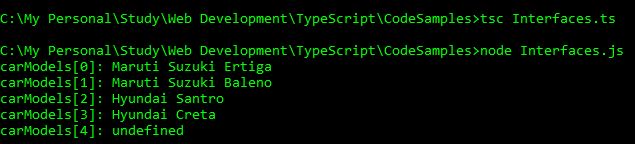
Below is the output of above code

Interface and Inheritance

We can inherit single or multiple interfaces and reuse their properties or methods multiple times.
Below is a sample code

interface IVehicle{
    model:string;
    color:string;
}
interface ICar{
    fuelType:string;
}
//Multiple Inheritance
interface IMaruti extends IVehicle, ICar{}
var myCar:IMaruti = {  
    model:"Hyundai Creta",
    color:"White",
    fuelType:"Petrol"
}
console.log(myCar.model + " is now available in " + myCar.color + " color in " + myCar.fuelType + " Fuel Type.");

//Single Inheritance
interface IBike extends IVehicle{}
var myBike:IBike = {
    model:"TVS Apache",
    color:"Black"
}
console.log(myBike.model + " is now available in " + myBike.color + " color.");

Below is the output of above code

Other Related Articles

Classes in TypeScript
Interface and Classes in TypeScript
Inheritance in TypeScript

Union in TypeScript

Till now we have seen variable declaration with one data type, or we can declare a variable with any data type so that we can store values of any data type in that. We use UNION if we want to restrict the data type of variable to two or more data types.
We combine two or more data types using pipe symbol (|) to denote a Union type.
Syntax

var variable:type1|typ2|type3|...

Below is an example

var empID:number|string;
empID = 1001;
console.log("Emp ID as number: " + empID);
empID = "EMP1001";
console.log("Emp ID as string: " + empID);

Below is the output of above code

You can also pass union type in function parameters and can also use in Arrays.
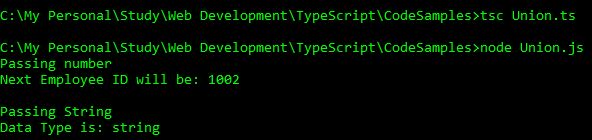
Below is an example of passing Union as Parameter

var empID:number|string;
empID = 1001;
console.log("Passing number");
check(empID);
empID = "1001";
console.log("\nPassing String");
check(empID);
function check(EID:number|string):void{
    if(typeof(EID)=="number"){
        var nextEID = EID+1;
        console.log("Next Employee ID will be: " + nextEID)
    }
    else{
        console.log("Data Type is: " + typeof(EID));
    }
}

Below is the output of above code

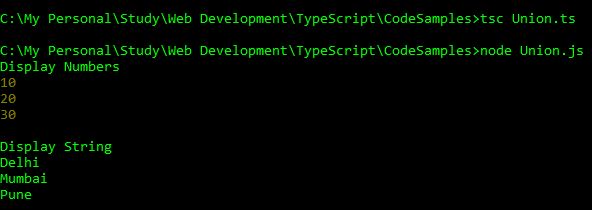
Below is an example of Union in Arrays

var empID:number[]|string[];
empID = [10,20,30];
console.log("Display Numbers");
displayArray(empID);

empID = ["Delhi","Mumbai","Pune"];
console.log("\nDisplay String");
displayArray(empID);

function displayArray(EIN:number[]|string[]):void{
    var i:number;
    for(i=0; i<EIN.length; i++){
        console.log(EIN[i]);
    }
}

Below is the output of above code

Tuples in TypeScript

We have seen Arrays where we can store multiple values, but of same data type.
But what if we want to store values of different data types in an array. In this case, we do not use Arrays. We use TUPLES. We can also use tuples in function, the same way we used arrays. Index of tuples starts with 0(zero) and we can get the number of elements in a tuple by using length property.

Syntax
var tupleVariable = [value1, value2, value3,...];
Declare and initialize a tuple
// Declare and initialize a tuple in one statement
var person = ["Akanksha","Delhi",9876543210]; 

// Create empty tuple and then initialize it in another statement
var person1 = [];
person1[0] = "Akanksha";
person1[1] = "Delhi";
person1[2] = "9876543210";
Access tuple elements

Below is an example

var person = ["Akanksha","Delhi",9876543210];
var i;
for(i=0; i<person.length;i++){
    console.log(person[i]);
}

Below is the output of above code

push() and pop()

push() method is used to add an element at the end of a tuple, hence increasing the length of the tuple. pop() method removes and returns the last value of the tuple, hence reducing the length of the tuple.
Below is an example

var person = ["Akanksha","Delhi",9876543210];
var i;
console.log("Length of Tuple before PUSH: " + person.length);
console.log("Items before PUSH");
for(i=0; i<person.length;i++){
    console.log(person[i]);
}

person.push("Software Developer");
console.log("\nPUSH Operation Performed");
console.log("Length of Tuple after PUSH: " + person.length);
console.log("Items of tuple after PUSH");
for(i=0; i<person.length;i++){
    console.log(person[i]);
}

person.pop();
console.log("\nPOP Operation Performed");
console.log("Length of Tuple after POP: " + person.length);
console.log("Items of tuple after POP");
for(i=0; i<person.length;i++){
    console.log(person[i]);
}

Below is the output of above code

Arrays in Functions

Arrays topic in TypeScript is divided into following parts:

In previous article, we have seen how to pass normal parameters in functions. Now we will see how to pass arrays as parameters in function and how to return arrays from functions.

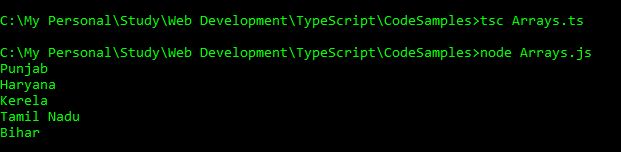
Array As Function Parameters
var indianStates:string[] = ["Punjab","Haryana", "Kerela","Tamil Nadu","Bihar"];
displayStates(indianStates);

function displayStates(states:string[]){
    var i;
    for(i=0; i<states.length;i++){
        console.log(states[i]);
    }
}

Below is the output of above code

Return Array from Function

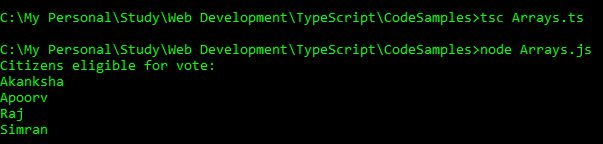
In below example, we will return the name of citizens who are eligible for vote.

var personAge:any[][] = [["Akanksha","Aarav","Apoorv","Raj","Simran"],[26,10,30,40,19]];
var citizens:string[] = voteValidity(personAge);
var i;
console.log("Citizens eligible for vote:");
for(i=0; i<citizens.length; i++){
    console.log(citizens[i]);
}
function voteValidity(age:any[][]):string[]{
    var names:any =  new Array();
    var j:number;
    for(j=0; j<5; j++){ if(age[1][j] > 18){
                names.push(age[0][j]);
            }
    }
    return names;
}

Below is the output of above code

Multidimensional Arrays

Arrays topic in TypeScript is divided into following parts:

Till now we have seed only single dimensional arrays which had only one row with values. In this section, we will discuss Multidimensional Arrays. Multidimensional Arrays are arrays with multiple rows and columns.

In this example, we will see an example of arrays with 3 rows and 3 columns.

var nums:number[][] = [[10,20,30],[40,50,60],[70,80,90]];
var i,j;
console.log("Using for loop!");
for(i=0; i<3; i++){
    for(j=0; j<3; j++)
    {
        console.log("[" + i + "]" + "[" + j + "]: " + nums[i][j]);
    }
}
console.log("Accessing directly!");
console.log("[0][1]: " + nums[0][1]);
console.log("[0][2]: " + nums[0][2]);
console.log("[0][0]: " + nums[0][0]);
console.log("[2][1]: " + nums[2][1]);
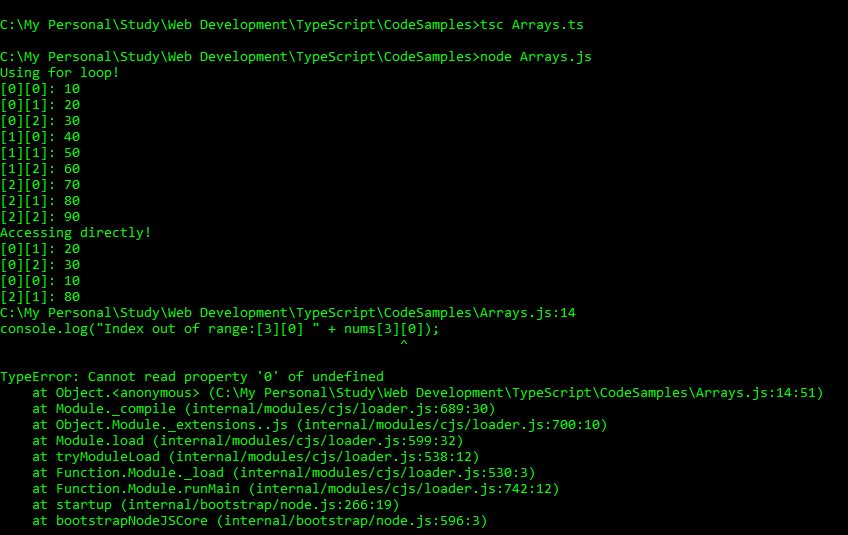
console.log("Index out of range:[3][0] " + nums[3][0]);

Below is the output of above code

Methods in Arrays – Part 3

Arrays topic in TypeScript is divided into following parts:

Below are the methods that are discussed in this section

reverse shift slice some
sort splice toString unshift
reverse

This method place the array elements in the reverse order.
Syntax

array.reverse();

Below is a sample code

var orgArr:number[] = [10,20,300];
console.log("Original array: " + orgArr);
var newArr:number[];
newArr = orgArr.reverse(); // assign the reversed array in a new array
console.log("Reversed Array: " + newArr); 
console.log("Original array is also modified: " + orgArr); // original array is also reversed

Below is the output of above code

shift

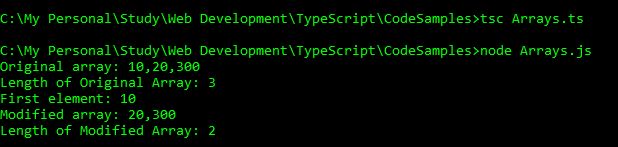
This method removes the first element of the array and returns that element, hence modifying the length of the array.
Syntax

array.shift();

Below is a sample code

var orgArr:number[] = [10,20,300];
console.log("Original array: " + orgArr);
console.log("Length of Original Array: " + orgArr.length);
var num:number = orgArr.shift();
console.log("First element: " + num);
console.log("Modified array: " + orgArr);
console.log("Length of Modified Array: " + orgArr.length);

Below is the output of above code

slice

This method returns a new array extracted from the original array based on the beginIndex and endIndex.
– beginIndex: The index from where you want to start the extraction. If the is negative, You can extract only those elements from the end of the array. Do not put endIndex if beginIndex is negative.
– endIndex: The index till where you want to continue the extraction. The element at this index is not included in the new array. This is optional.
Syntax

array.slice(beginIndex [, endIndex]);

Below is a sample code

var orgArr:number[] = [10,20,30,40,50,60];
console.log("Original array: " + orgArr);
console.log("array.slice(0): " + orgArr.slice(0));
console.log("array.slice(1): " + orgArr.slice(1));
console.log("array.slice(0,2): " + orgArr.slice(0,2));
console.log("array.slice(1,2): " + orgArr.slice(1,2));
console.log("array.slice(1,3): " + orgArr.slice(1,3));
console.log("array.slice(-1,2): " + orgArr.slice(-1,2));
console.log("array.slice(-1): " + orgArr.slice(-1));
console.log("array.slice(-2): " + orgArr.slice(-2));
console.log("array.slice(-1,4): " + orgArr.slice(-1,4));

Below is the output of above code

some

This method tests whether some array element passes the test implemented by the function. This method is different from every() method where all the array elements have to pass the test.
– Returns true even if one array element passes in the function test. It will return false if all the array element fails in the function test.
– functionName is the function that tests the array elements
Syntax

array.some(functionName);

Below is an example

// returns true
function test1(element, index, array) { 
    return (element >= 10); 
 } 
 var nums1:number[] = [1,2,3];
 var result1 = nums1.some(test1); 
 console.log("Test Value : " + result1);
 
 // returns false
 function test2(element, index, array) { 
    return (element >= 10); 
 } 
 var nums2:number[] = [10,5,30,2];
 var result2 = nums2.some(test2); 
 console.log("Test Value : " + result2 );

Below is the output of above code

sort

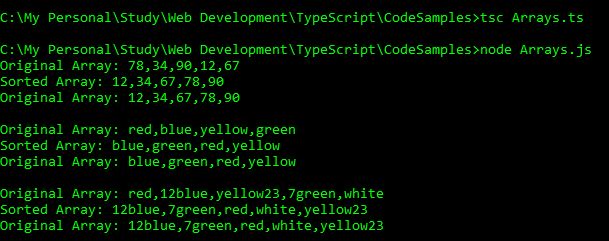
This method is used to sort the elements of the array based on a mentioned function. If the functionName is not specified, the array is sorted in lexicographically.
Syntax

array.sort(functionName);

Below is an example

var orgNumArr:number[] = [78,34,90,12,67];
console.log("Original Array: " + orgNumArr);
var newNumArr:number[] = orgNumArr.sort();
console.log("Sorted Array: " + newNumArr);
console.log("Original Array: " + orgNumArr);

var orgStrArr:string[] = ["red", "blue", "yellow", "green"];
console.log("\nOriginal Array: " + orgStrArr);
var newStrArr:string[] = orgStrArr.sort();
console.log("Sorted Array: " + newStrArr);
console.log("Original Array: " + orgStrArr);

var orgAlphaArr:string[] = ["red", "12blue", "yellow23", "7green","white"];
console.log("\nOriginal Array: " + orgAlphaArr);
var newAlphaArr:string[] = orgAlphaArr.sort();
console.log("Sorted Array: " + newAlphaArr);
console.log("Original Array: " + orgAlphaArr);

Below is the output of above code

splice

This method is used to add or remove array elements, hence modifying the array.
– index: index specifies the index from where we should start modifying the array.
– removeCount: this is used to mention the number of elements to be removed after the index. If you do not want to remove any element, specify 0.
– element1, element2,… : elements to be added in the array. This is optional. Mention the elements if you want to add the elements.
Syntax

array.splice(index, removeCount [element1, element2, ...]);

Below is an example

var orgArr:string[] = ["red", "blue", "yellow", "green","orange"];
console.log("Original Array: " + orgArr);
console.log("Original Length: " + orgArr.length);

console.log("\nAdding black at 3rd index and removing 0 elements.");
var element = orgArr.splice(3,0,"black");
console.log("Modified array: " + orgArr);
console.log("Removed element: " + element);
console.log("New Length: " + orgArr.length);

console.log("\nRemoving 1 element from 3rd index");
console.log("Array: " + orgArr);
var element = orgArr.splice(3,1);
console.log("Modified array: " + orgArr);
console.log("Removed element from 1st index: " + element);
console.log("New Length: " + orgArr.length);

console.log("\nRemove 2 elements from 2nd index then add white to 2nd index.");
console.log("Array: " + orgArr);
var element = orgArr.splice(2,2, "white");
console.log("Modified array: " + orgArr);
console.log("Removed element from 4th index: " + element);
console.log("New Length: " + orgArr.length);

Below is the output of above code

toString

Returns a string representing array and its elements.
Syntax

array.toString();

Below is an example

var orgArr:number[] = [10,20,30,40];
console.log("Original Array: " + orgArr);
console.log("typeOf of Original Array: " + typeof(orgArr));
var strArray = orgArr.toString();
console.log("String representation of array: " + strArray);
console.log("typeOf of Modified Array: " + typeof(strArray));
console.log("typeOf of Original Array: " + typeof(orgArr));

Below is the output of above code

unshift

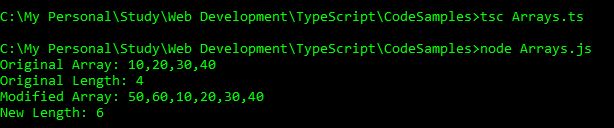
This method will add elements in the beginning of the array and returns the new length of the array,
Syntax

array.unshift(element1 [,element2, element3,...]);

Below is an example

var orgArr:number[] = [10,20,30,40];
console.log("Original Array: " + orgArr);
console.log("Original Length: " + orgArr.length);
var newLength = orgArr.unshift(50,60);
console.log("Modified Array: " + orgArr);
console.log("New Length: " + newLength);

Below is the output of above code

Methods in Arrays – Part 2

Arrays topic in TypeScript is divided into following parts:

Below are the methods that are discussed in this section

lastIndexOf map pop
push reduce reduceRight
lastIndexOf

This method returns the last index at which an element can be found. It will return -1 if the element is not found.
Returns the last index of the element.
element: this is the element that we are searching in the array
fromIndex: Index from which we need to start searching backwards. This is optional.
Syntax

arrayName.lastIndexOf(element, [fromIndex]);

Below is a sample code

var users:string[] = ["Akanksha","Anita", "Aarav","Apoorv","Anita","Raj"];
console.log("Original Array: " + users);
console.log(users.lastIndexOf("Anita"));
console.log(users.lastIndexOf("Anil"));

Below is the output of above code

map

This method creates a new array with the results of calling a function on every element in the array.
Syntax

arrayName.map(function);

Below is a sample code

var starter = [10,20,30];
function multiplyByFive (val, index, arr) {
    return val * 5;
}
var result = starter.map(multiplyByFive);
console.log(result);

Below is the output of above code

pop

This method removes the last element of the array and returns it.
Syntax

arrayName.pop();

Below is a sample code

var nums:number[] = [10,20,30];
console.log("Original array: " + nums);
console.log("Removing last element: " + nums.pop());
console.log("Modified array: " + nums);

Below is the output of above code
push

This method adds a new element at the end of the array and returns the length of the array.
Syntax

arrayName.push(element1, element2, .....);

Below is an example

var nums:number[] = [10,20,30];
console.log("Original array: " + nums);
console.log("New length of the array: " + nums.push(40,50));
console.log("Modified array: " + nums);

Below is the output of above code
reduce

This method applies a function simultaneously against two values of an array, from left to right, to reduce the array to a single value.
Syntax

array.reduce(function);

Below is an example

var nums:number[] = [10,20,3];
function multiply(a:number, b:number):number{
    return (a*b);
}
console.log(nums.reduce(multiply));

In the above example, it will first multiply 10 with 20. This will give 200. Then it will multiply 200 with 3, resulting in 600. That is, it will perform the operation in left to right direction.
Below is the output of above code

reduceRight

This method applies a function simultaneously against two values of an array, from right to left, to reduce the array to a single value.
Syntax

array.reduceRight(function);

Below is an example

var nums:number[] = [10,20,300];
function subtract(a:number, b:number):number{
    return (a-b);
}
console.log(nums.reduceRight(subtract));

In this example, first it will subtract 20 from 300, which will return 280. Then it will subtract 10 from 280, resulting in 270. That is, it will perform the operation in right to left direction.
Below is the output of above code

Power Platform Academy

Start or Upgrade your Career with Power Platform

Learn with Akanksha

Python | Azure | AI/ML | OpenAI | MLOps

Design a site like this with WordPress.com
Get started