I am using jsbin.com for demo purpose.
- Arrow functions is a different syntax for JavaScript functions.
- A normal JavaScript function looks like this with a function keyword. Parameters are optional.
function myFunc(parameters){
// lines of code
}
Below is an example of JavaScript function.
function myFunc(name){
  console.log(name);
}
myFunc("Akanksha");
The output of above code is “Akanksha“.
Arrow Functions
- An Arrow function looks like this. Parameters are optional.
const myFunc = (parameters) => {
// lines of code
}
- Solves many problems that we have with this keyword.
Below is the conversion of above JavaScript function in an Arrow function.
const myFunc = (name) => {
  console.log(name);
}
myFunc("Akanksha");
The output of above code is also “Akanksha“.
- If there is a single parameter, you can omit the round brackets. This syntax is not valid with zero or multiple parameters. You have to provide brackets at that time.
const myFunc = name => {}
- Passing multiple parameters
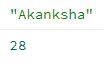
const myFunc1 = (name, age) => {
  console.log(name, age);
}
myFunc1("Akanksha",28);
Below is the output of above code
- Syntax when Arrow function have return statement as the only statement. We do not need to include curly brackets and return keyword. Complete Arrow function can be written in single line. Below is an example of an Arrow function with a single line of code as the return statement. Please NOTE that this one-liner syntax is not applicable if there are multiple statements with return statement as one of them OR any other statement apart from return statement. This syntax works only with return statement as a single statement.
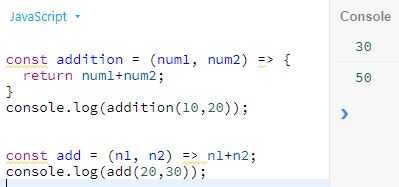
const addition = (num1, num2) => {
  return num1+num2;
}
console.log(addition(10,20));

const add = (n1, n2) => n1+n2;
console.log(add(20,30));
Below is the output of above code
 Akanksha's Blog