Client Side Object Model (.NET) – Sample code for List Items

Below is the code for SharePoint list item using CSOM (.NET). You can modify it as per your requirement.

class Program
{
        static void Main(string[] args)
        {
            string username = "Your username";
            string siteURL="Your SiteURL";
            Console.WriteLine("Enter your password: ");
            SecureString password = GetPassword();
            string listname = "SampleList";
            CSOMListItems.GetListItems(siteURL, username, password, listname);
        }
        public static SecureString GetPassword()
        {
            ConsoleKeyInfo info;
            SecureString securePassword = new SecureString();
            do{
                info = Console.ReadKey(true);
                if(info.Key!=ConsoleKey.Enter)
                {
                    securePassword.AppendChar(info.KeyChar);
                }
            }
            while(info.Key!=ConsoleKey.Enter);
            return securePassword;
        }
}
class CSOMListItems
{
        // Create a new List Item
        public static void CreateListItem(string siteURL, string username, SecureString password, string listname)
        {
            using (ClientContext context = new ClientContext(siteURL))
            {
                context.Credentials = new SharePointOnlineCredentials(username, password);
                Web web = context.Web;
                List list = web.Lists.GetByTitle(listname);
                ListItemCreationInformation info = new ListItemCreationInformation();
                ListItem item = list.AddItem(info);
                item["FirstName"] = "Jim";
                item["Title"] = "Grant";
                item["Email"] = "Jim@hotmail.com";
                item["Company"] = "XYZ";
                item.Update();
                context.ExecuteQuery();
                Console.WriteLine("Item Added Successfully!");
                Console.ReadLine();
            }
        }

        // Get all List Items
        public static void GetListItems(string siteURL, string username, SecureString password, string listname)
        {
            using (ClientContext context = new ClientContext(siteURL))
            {
                context.Credentials = new SharePointOnlineCredentials(username, password);
                Web web = context.Web;
                List list = web.Lists.GetByTitle(listname);
                context.Load(list);
                CamlQuery query = CamlQuery.CreateAllItemsQuery(100);
            
                ListItemCollection itemColl = list.GetItems(query);
                context.Load(itemColl, i => i.Include(item => item, item => item["FirstName"], item=>item["Title"]));
                context.ExecuteQuery();
                foreach (ListItem item in itemColl)
                {
                    Console.WriteLine(item["FirstName"] + " " + item["Title"]);
                }
                Console.ReadLine();
            }
        }

        // Update List Item
        public static void UpdateListItem(string siteURL, string username, SecureString password, string listname)
        {
            using (ClientContext context = new ClientContext(siteURL))
            {
                string firstname = "John";
                string lastname = "Corbett";
                context.Credentials = new SharePointOnlineCredentials(username, password);
                Web web = context.Web;
                List list = web.Lists.GetByTitle(listname);
                context.Load(list);
                CamlQuery query = CamlQuery.CreateAllItemsQuery(100);
                ListItemCollection itemColl = list.GetItems(query);
                context.Load(itemColl, i => i.Include(item => item, item => item["FirstName"], item => item["Title"], 
                             item=>item["WorkPhone"]));
                context.ExecuteQuery();
                foreach (ListItem item in itemColl)
                {
                    if(item["FirstName"].Equals(firstname) && item["Title"].Equals(lastname))
                    {
                        item["WorkPhone"] = "575577";
                        item.Update();
                    }
                }
                Console.WriteLine("List Item Updated Successfully!");
                Console.ReadLine();
                context.ExecuteQuery();
            }
        }

        // Delete a List Item
        public static void DeleteListItem(string siteURL, string username, SecureString password, string listname)
        {
            using (ClientContext context = new ClientContext(siteURL))
            {
                context.Credentials = new SharePointOnlineCredentials(username, password);
                Web web = context.Web;
                List list = web.Lists.GetByTitle(listname);
                ListItem item = list.GetItemById(2);
                item.DeleteObject();
                context.ExecuteQuery();
                Console.WriteLine("List Item Deleted Successfully!");
                Console.ReadLine();
            }
        }

        // Get total number of list items in a list
        public static void GetListItemCount(string siteURL, string username, SecureString password, string listname)
        {
            using(ClientContext context=new ClientContext(siteURL))
            {
                context.Credentials = new SharePointOnlineCredentials(username, password);
                Web web = context.Web;
                List list = web.Lists.GetByTitle(listname);
                context.Load(list, l => l.ItemCount);
                context.ExecuteQuery();
                int itemCount=list.ItemCount;
                Console.WriteLine("Total number of items in " + listname + " are: " + itemCount);
                Console.ReadLine();                  
            }
        }
}

Other Related Articles

CRUD Operations on List using CSOM
CRUD Operations on Web using CSOM
ExecuteQuery vs ExecuteQueryAsync
CRUD Operation on List Items using SharePoint-Hosted Add-In
Client-Side Object Model (.NET) – Sample Code for Lists

Below are some sample code for Lists created using Client-Site Object Model with .NET.

class Program
{
        static void Main(string[] args)
        {
            string username = "Your Username";
            string siteURL="Your SiteURL";
            Console.WriteLine("Enter your password: ");
            SecureString password = GetPassword();
            string listname = "SampleList";
            CSOMList.CreateNewList(siteURL, username, password, listname);
        }
        public static SecureString GetPassword()
        {
            ConsoleKeyInfo info;
            SecureString securePassword = new SecureString();
            do{
                info = Console.ReadKey(true);
                if(info.Key!=ConsoleKey.Enter)
                {
                    securePassword.AppendChar(info.KeyChar);
                }
            }
            while(info.Key!=ConsoleKey.Enter);
            return securePassword;
        }
}
class CSOMList
{
        // Get all the existing lists in the current web
        public static void GetAllWebLists(string siteURL, string username, SecureString password)
        {
            using (ClientContext context = new ClientContext(siteURL))
            {
                context.Credentials = new SharePointOnlineCredentials(username, password);
                Web web = context.Web;
                context.Load(web.Lists, lists => lists.Include(list => list.Title, list => list.Id));
                context.ExecuteQuery();
                foreach (List list in web.Lists)
                {
                    Console.WriteLine(list.Title);
                }
                Console.ReadLine();
            }
        }

        // Create new list. Checks whether lists exists or not. 
        // If exists, delete and recreate it. 
        // You can modify the code as per your requirement like ask user before deleting ett.
        public static void CreateNewList(string siteURL, string username, SecureString password, string listname)
        {
            using(ClientContext context=new ClientContext(siteURL))
            {
                context.Credentials = new SharePointOnlineCredentials(username, password);
                Web web = context.Web;

                int result = CheckIfListExits(siteURL, username, password, listname);
                if (result == 1)
                    DeleteList(siteURL, username, password, listname);

                ListCreationInformation info = new ListCreationInformation();
                info.Title = listname;
                info.QuickLaunchOption = QuickLaunchOptions.On;
                info.TemplateType = (int)ListTemplateType.Contacts;
                List newList = web.Lists.Add(info);
                
                // Updating list info. You can do it in another method as well.
                newList.Description = "My Sample List";
                newList.Update();
                context.ExecuteQuery();
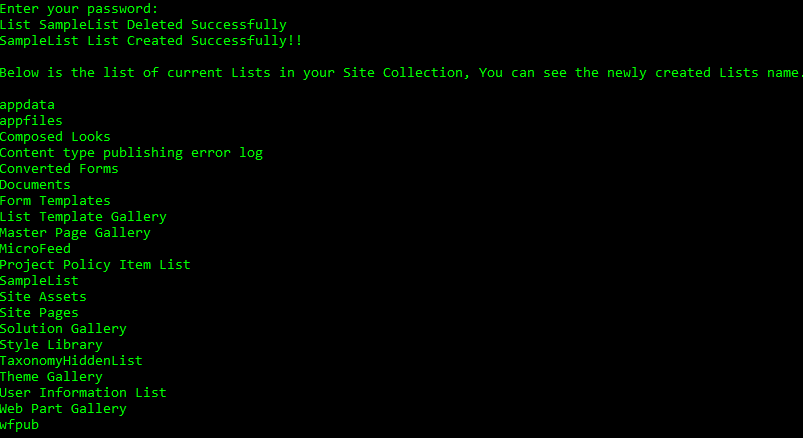
                Console.WriteLine(listname + " List Created Successfully!!");
                Console.WriteLine("\nBelow is the list of current Lists in your Site Collection, You can see the newly created Lists 
                                   name.\n");
                GetAllWebLists(siteURL, username, password);
            }
        }

        // Delete List
        public static void DeleteList(string siteURL, string username, SecureString password, string listname)
        {
            using (ClientContext context = new ClientContext(siteURL))
            {
                context.Credentials = new SharePointOnlineCredentials(username, password);
                Web web = context.Web;
                List list = web.Lists.GetByTitle(listname);
                list.DeleteObject();
                context.ExecuteQuery();
                Console.WriteLine("List " + listname + " Deleted Successfully");
            }
        }

        // Check if list already exisis or not.
        // Return 1, if exists; 0 if not.
        public static int CheckIfListExits(string siteURL, string username, SecureString password, string listname)
        {
            using(ClientContext context=new ClientContext(siteURL))
            {
                context.Credentials = new SharePointOnlineCredentials(username, password);
                Web web = context.Web;
                context.Load(web.Lists, lists => lists.Include(list => list.Title));
                context.ExecuteQuery();
                foreach (List list in web.Lists)
                {
                    if (list.Title == listname)
                        return 1;
                }
                return 0;
            }
        }
}

Below is the output of above code:

Get All Web Properties using CSOM in SharePoint Online through Visual Studio

Below is a sample code using Client-Side Object Model (CSOM) to connect to SharePoint Online Site using Visual Studio. We are just fetching the Title and URL of the site. Below are the steps:

    • Open Visual Studio. Select a Console Application. You can also use Forms Application for this program.
    • Add Microsoft.SharePointOnline.CSOM as a Reference using NuGet Packages.
    • Write the following code in the Programs.cs file.
class Program
    {
        static void Main(string[] args)
        {
            string username = "YourUserName";
            string siteURL="YourSiteURL";
            Console.WriteLine("Enter your password: ");
            SecureString password = GetPassword();
            GetAllWebProperties(siteURL, username, password);
        }

        public static void GetAllWebProperties(string siteURL, string username, SecureString password)
        {
            using (var context = new ClientContext(siteURL))
            {
                context.Credentials = new SharePointOnlineCredentials(username, password);
                Web web = context.Web;
                context.Load(web);
                context.ExecuteQuery();
                Console.WriteLine("Title: " + web.Title + "; URL: " + web.Url);
                Console.ReadLine();
            }
        }
        public static SecureString GetPassword()
        {
            ConsoleKeyInfo info;
            SecureString securePassword = new SecureString();
            do{
                info = Console.ReadKey(true);
                if(info.Key!=ConsoleKey.Enter)
                {
                    securePassword.AppendChar(info.KeyChar);
                }
            }
            while(info.Key!=ConsoleKey.Enter);
            return securePassword;
        }
    }

This will ask you to enter the password. Enter the password that you use to access your Site Collection.
You will get the below output.

Power Platform Academy

Start or Upgrade your Career with Power Platform

Learn with Akanksha

Python | Azure | AI/ML | OpenAI | MLOps

Design a site like this with WordPress.com
Get started