Methods in Arrays – Part 1

Arrays topic in TypeScript is divided into following parts:

Below are the methods that are discussed in this section

concat every filter
forEach indexOf join
concat

This contacts two or more arrays and returns a new array.
Syntax

array1.concat(array2, array3,...);

Below is a sample code

var nums:string[] = new Array("10","20","30");
var chars:string[] = new Array('a','b','c');
var strings:string[] = new Array("Hello","Hi");
var i:number;
var newArray = strings.concat(chars, nums);
for(i=0; i<newArray.length; i++){
    console.log(newArray[i]);
}

Below is the output of above code

every

This method tests whether all array elements passes the test implemented by the function.
Returns true is all the array elements passes in the function test, otherwise false.
functionName is the name of the function used to test the array elements
Syntax

arrayName.every(functionName);

Below is a sample code

// returns true
function test1(element, index, array) { 
    return (element >= 10); 
 } 
 var nums1:number[] = [10,20,30];
 var result1 = nums1.every(test1); 
 console.log("Test Value : " + result1);

 // returns false
 function test2(element, index, array) { 
    return (element > 10); 
 } 
 var nums2:number[] = [10,5,30];
 var result2 = nums2.every(test2); 
 console.log("Test Value : " + result2 );

Below is the output of above code

filter

This function will create a new array with the elements that passes a test implemented by a function.
Returns a new array
functionName is the name of the function used to test the array elements
Syntax

arrayName.filter(functionName);

Below is a sample code

function even(element, index, array) { 
    return (element%2 == 0); 
 } 
 var nums1:number[] = [5,10,20,30,105,64];
 var result1 = nums1.filter(even); 
 console.log("Even Numbers: " + result1);

Below is the output of above code

forEach

This method calls a function for each element in the array.
Syntax

arrayName.forEach(funcionName)

Below is an example

let users = ["Akanksha","Aarav","Anita","Raj"];
users.forEach(function(value){
    console.log(value);
});

Below is the output of above code

indexOf

This method will return the first index in which the element is found. It will return -1 if the element is not found.
Returns the first index in which the element is found. It only returns one index even if the value is present at multiple indexes
value: the value which we are looking in the array
fromIndex: the index from which we want to start the search. This is optional. By default, it will start the search from the beginning of the array.
Syntax

arrayName.indexOf(value, [fromIndex[);

Below is an example

var nums:number[] = [10,20,30,20,40,50,10];
console.log("Original array: " + nums);
console.log("Search for value 20: " + nums.indexOf(20));
console.log("Search for value 20, search start from 2nd index: " + nums.indexOf(20,2));
console.log("Search for 50: " + nums.indexOf(50));

Below is the output of above code

join

This method joins all the array elements into a string. We can pass a custom separator which can be used to separate the array values in the string. By default, it will use comma (,) as a separator.
Syntax

arrayName.join(separator);

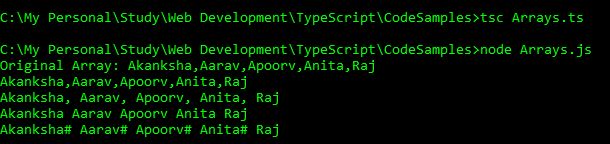
Below is an example

var users:string[] = ["Akanksha","Aarav","Apoorv","Anita","Raj"];
console.log("Original Array: " + users);
console.log(users.join());
console.log(users.join(", "));
console.log(users.join(" "));
console.log(users.join("# "));

Below is the output of above code
Strings in TypeScript – Part 1

I am dividing Strings in three parts.

  • Part 1. This is Part 1
  • Part 2
  • Part 3
  • This section has the details of following topics:

    constructor length prototype
    charAt concat indexOf

    In simple terms, Strings is a collection of characters. We can create an object of String class and perform many functions on it.
    Syntax for creating a new String object and assigning value to it.

    var variableName = new String(value);
    
    String Constructor: String()

    It is used to create an object of String type. We can also assign an initial value to that String object.
    Below is an example of creating a String object, assigning a string value to it using a constructor and fetching that value.

    var str=new String("Hello");
    console.log(str.valueOf());
    

    Below is the output of above code

    length

    Returns the length of the string. Counts the white spaces as well. This will return the number.
    Syntax

    variable.Length
    

    Below is a sample code

    var str = new String("Hello World!!");
    console.log("Length of String: " + str.length);
    

    Below is the output of above code

    charAt()

    This method will return the character at a specified index. The index starts with 0(zero) and the index of the last character is string.length – 1. Index which is out of range returns nothing, not even undefined.
    Syntax

    variable.charAt(index);
    

    Below is a sample code

    var str = new String("Hello World!!");
    console.log("1st Character: " + str.charAt(0));
    console.log("3rd character: " + str.charAt(2));
    console.log("6th Character, which is space: " + str.charAt(5));
    console.log("7th character: " + str.charAt(6));
    console.log("Index which is out of range: " + str.charAt(13));
    

    Below is the output of above code

    concat()

    This method merges two or more strings into a one single string.
    Syntax

    string1.concat(string2, string3, ....);
    

    Below is a sample code

    var var1:string = "Hello ";
    var var2:string = "Friends!! ";
    var var3:string = "Good Morning.";
    var result = var1.concat(var2);
    var result1 = var1.concat(var2,var3);
    console.log("var1 + var2: " + result);
    console.log("var1 + var2 + var3: " + result1);
    

    Below is the output of above code

    indexOf

    This method returns the index of a specified value within a string. Search will start from the starting of the string. variable is the string in which we are searching for the value. searchString is the value which we are searching in the variable. fromIndex is an integer which specify the starting index for the search. It will return -1 if the string is not found.
    Syntax

    variable.indexOf(searchString, [fromIndex])
    

    Below is an example

    var str1 = new String("This is a sample string sample");
    console.log("Index of i: " + str1.indexOf('i'));
    console.log("Index of s: " + str1.indexOf('s', 8));
    console.log("Index of is: " + str1.indexOf("is"));
    console.log("Index of sample: " + str1.indexOf("sample"));
    console.log("Index of sample: " + str1.indexOf("sample", 14));
    

    Below is the output of above code

Strings in C#

String is nothing but a collection of characters be it collection of alphabets, alphanumeric or include special symbols. String is always enclosed within double quotes. Examples of String are: “Hello”,”Hello World!”,”P@ssw0rd2018″ etc.

We can do lots of manipulation on these string values. System.String provides a number of methods that we can use to manipulate these values. Lets see how to do that. I am creating a Console Application StringDemo.

Assign value to a string variable:

String value = "Hello World";

Concat()
We can concatenate two or more string values in one using plus (+) sign or using
Concat function.

String val1 = "My name is";
String val2 = "David";
String val3 = "Miller";
String val4 = val1 + " " + val2 + "!";
Console.WriteLine("Concatenated Value using + sign: " + val1 + " " + val2);
Console.WriteLine("Value of val4: " + val4);
String val5 = String.Concat(val1, " ",val2, " ", val3);
Console.WriteLine("Concatenated value using Concat function: " + val5);

Below is the result of the above code:

Length
Length is used to calculate the number of characters that are there in the string. It also counts the space characters. Result of below code is:

String value = "Hello World";
Console.WriteLine("Length of " + value + "is: " + value.Length);

Below is the result of the above code:

Compare()
C# is case-sensitive. Hence Hello is different from hello. Compare function is used to compare two strings. This function returns an integer value. If this returns 0, he values are same. If this returns 1, values are different. Below is the sample code:

String val1 = "Hello";
String val2 = "Hello";
String val3 = "hello";
int result = String.Compare(val1, val3);
int result1 = String.Compare(val1, val2);
int result2 = String.Compare(val1, val3, true);
Console.WriteLine("Comparison of Hello and hello: " + result);
Console.WriteLine("Comparison of Hello and Hello: " + result1);
Console.WriteLine("Comparison of Hello and hello, ignored the case: " + result2);

Below is the result of the above code:

Contains()
This method determines whether a string contains a specified substring. It will return a bool value, either true or false.
Below is a sample code:

String val = "Hello World";
bool result = val.Contains("Wor");
bool result1 = val.Contains("Hi");
Console.WriteLine("Hello World contains Wor? " + result);
Console.WriteLine("Hello World contains Hi? " + result1);

Below is the result of the above code:

Insert()
Insert() method inserts a specified string within a string at a given index. The index starts with 0.

String original = "HelloWorld!";
Console.WriteLine("The original string: '{0}'", original);
String updated = original.Insert(5, " ");
Console.WriteLine("The modified string: '{0}'", updated);
String updated1 = original.Insert(5, " Big ");
Console.WriteLine("The modified string: '{0}'", updated1);

Below is the result of above code:

PadLeft(), PadRight()
These methods are used to pad a character either left or right of a string.
Below is the sample code:

String name = "David";
char char1 = '*';
Console.WriteLine(name.PadLeft(15, char1));
Console.WriteLine(name.PadLeft(3, char1));
Console.WriteLine(name.PadRight(15, char1));
Console.WriteLine(name.PadRight(6, char1));

Below is the output of above code:

Insert(), Remove(), Replace()
Insert() method is used to insert a given string into another string at a specific index.
Remove() method is used to delete a specified number of characters from a specified string.
Replace() method is used to replace all occurrences of a specified character with another character in a specified string.
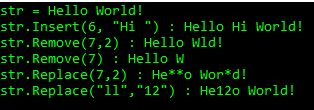
Below is the sample code for above method:

String str = "Hello World!";
Console.WriteLine("str = " + str);
Console.WriteLine("str.Insert(6, \"Hi \") : " + str.Insert(6, "Hi "));
Console.WriteLine("str.Remove(7,2) : " + str.Remove(7,2));
Console.WriteLine("str.Remove(7) : " + str.Remove(7));
Console.WriteLine("str.Replace(7,2) : " + str.Replace('l','*'));
Console.WriteLine("str.Replace(\"ll\",\"12\") : " + str.Replace("ll","12"));

Below is the result of above code:

Split()
This method is used to split a string in an array.
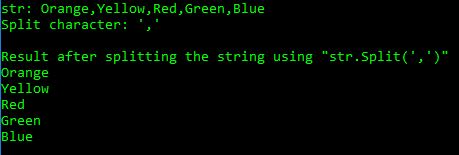
Below is the sample code for above method:

String str = "Orange,Yellow,Red,Green,Blue";
String[] colors=str.Split(',');
Console.WriteLine("str: " + str);
Console.WriteLine("Split character: \',\'");
Console.WriteLine();
Console.WriteLine("Result after splitting the string using \"str.Split(\',\')\"");
foreach(String s in colors)
{
    Console.WriteLine(s);
}

Below is the result of the above code:

Trim()
Trim() removes all the leading and trailing white-space characters from the string.
Below is the sample code:

String str = " Hello World ";
Console.WriteLine("str: " + str + "!");
Console.WriteLine("str.Trim(): " + str.Trim() + "!");

Below is the result of above code:

ToUpper(), ToLower()
ToUpper() is used to convert the complete string in upper-case.
ToLower() is used to convert the complete string in lower-case.
Below is the sample code:

String str = "Hello World!";
Console.WriteLine("str: " + str);
Console.WriteLine("str.ToUpper() : " + str.ToUpper());
Console.WriteLine("str.ToLower() : " + str.ToLower());

Below is the output of above code:

Power Platform Academy

Start or Upgrade your Career with Power Platform

Learn with Akanksha

Python | Azure | AI/ML | OpenAI | MLOps

Design a site like this with WordPress.com
Get started