C# programs can be created in many ways like Windows Forms Application, Console Application etc. Let’s create a sample console application “Hello World”. I am using Microsoft Visual Studio Ultimate 2013.
-
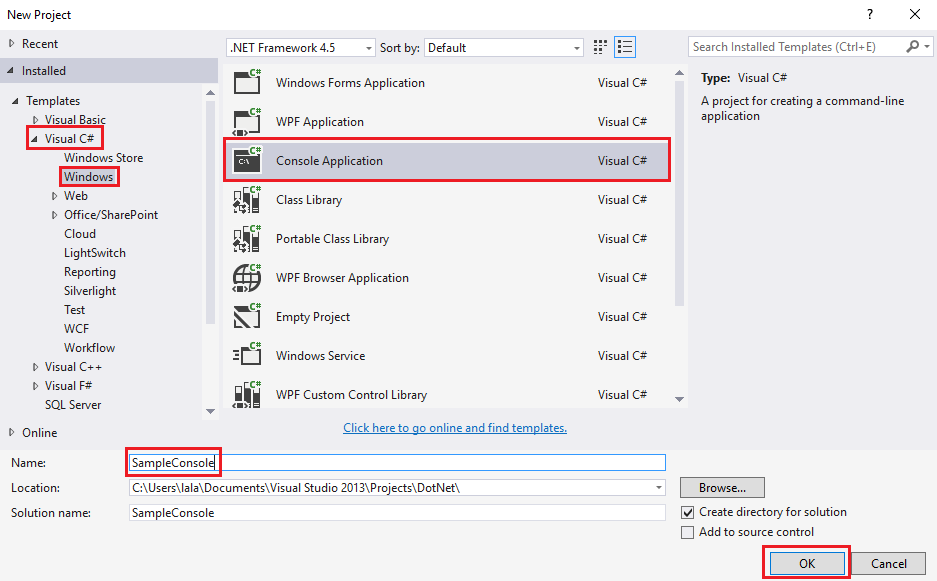
- Open Visual Studio –> Click on New Project.
- Select Console Application from the given templates. Give your project a friendly name, without any spaces. Click OK. This will create a new project.
-
-
- When the project is created, you will see the below screen. The default class is Program and default function is Main() which defines the entry point of the application.
-

-
- Copy the below code in your Main() function.
Console.WriteLine("Hellow World!");

Console.ReadLine();
- Copy the below code in your Main() function.

Console.Write() writes the text representation of the specified value or values to the standard output stream.
Console.WriteLine() writes the text representation of the specified object, followed by the current line terminator, to the standard output stream.
Console.Readline() reads the next line of characters from the standard input stream.
-
- Press F5 to run the program. You will see below output on Command Prompt.

 Akanksha's Blog