CRUD Operations using JavaScript in SharePoint-Hosted Add-In (Lists)

You can either continue this article or use the below code in your own way. This code is written in Apps.js file.

Below are the sample JavaScript codes for lists operations:

var hostWebUrl;
var appWebUrl;
var ctx ;
var appCtxSite;
var web;

$(document).ready(function () {
    hostWebUrl = decodeURIComponent(manageQueryStringParameter('SPHostUrl'));
    appWebUrl = decodeURIComponent(manageQueryStringParameter('SPAppWebUrl'));
    ctx = new SP.ClientContext(appWebUrl);
    appCtxSite = new SP.AppContextSite(ctx, hostWebUrl);
    web = appCtxSite.get_web();
    getAllLists();
});

// function to delete a list
function deleteList() {
    var list = web.get_lists().getByTitle('My Contacts');
    list.deleteObject();
    ctx.executeQueryAsync(
        Function.createDelegate(this, function () { alert("List deleted successfully");}),
        Function.createDelegate(this, this.onFail));
}

//function to update an existing list
function updateList() {
    var list = web.get_lists().getByTitle('My Contacts');
    list.set_description('My Personal Contacts');
    list.update();
    ctx.load(list);
    ctx.executeQueryAsync(Function.createDelegate(this, function () {
        alert("Title: " + list.get_title() + " , Description: " + list.get_description());
    }), Function.createDelegate(this, this.onFail));
}

// function to create new list in the host web 
function createList()
{
    var listInfo = new SP.ListCreationInformation();
    listInfo.set_title('My Contacts');
    listInfo.set_templateType(SP.ListTemplateType.contacts);
    this.list = web.get_lists().add(listInfo);
    ctx.load(list);
    ctx.executeQueryAsync(
        Function.createDelegate(this, function () {
            alert(this.list.get_title() + " new list created!");
        }),
        Function.createDelegate(this, this.onFail));
}

// function to get all List names in the host web
function getAllLists() {
    this.listColl = web.get_lists();
    ctx.load(this.listColl);
    ctx.executeQueryAsync(
        Function.createDelegate(this, this.onGetAllListsSucceed),
        Function.createDelegate(this, this.onFail));
}

// success method of getAllLists function
function onGetAllListsSucceed() {
    //var list = '';
    var listEnumerator = this.listColl.getEnumerator();
    while(listEnumerator.moveNext()){
        var list = listEnumerator.get_current();
        document.getElementById("message").innerHTML = document.getElementById("message").innerHTML + list.get_title() + "</br>";
    }
}

// generic Fail method
function onFail()
{
    alert("Failed!" + arguments[1].get_message());
}

// function to get the specific list properties
function getSpecificListProperties() {
    this.listColl = web.get_lists();
    ctx.load(listColl, 'Include(Title, Id)');
    ctx.executeQueryAsync(
        Function.createDelegate(this, this.onGetSelectedListProperties),
        Function.createDelegate(this, this.onFail));
}

// success method of getSpecificListProperties function
function onGetSelectedListProperties()
{
    var listEnumerator = this.listColl.getEnumerator();
    while (listEnumerator.moveNext()) {
        var list = listEnumerator.get_current();
        document.getElementById("message").innerHTML = document.getElementById("message").innerHTML +
            list.get_title() + " -- " + list.get_id().toString() + "</br>";
    }
}

// function to manage the query string parameters and return SPHostURL or SPAppWebUrl as per the request.
function manageQueryStringParameter(paramToRetrieve) {
    var params =
    document.URL.split("?")[1].split("&");
    var strParams = "";
    for (var i = 0; i < params.length; i = i + 1) {
        var singleParam = params[i].split("=");
        if (singleParam[0] == paramToRetrieve) {
            return singleParam[1];
        }
    }
}
Client-Side Object Model (.NET) – Sample Code for Lists

Below are some sample code for Lists created using Client-Site Object Model with .NET.

class Program
{
        static void Main(string[] args)
        {
            string username = "Your Username";
            string siteURL="Your SiteURL";
            Console.WriteLine("Enter your password: ");
            SecureString password = GetPassword();
            string listname = "SampleList";
            CSOMList.CreateNewList(siteURL, username, password, listname);
        }
        public static SecureString GetPassword()
        {
            ConsoleKeyInfo info;
            SecureString securePassword = new SecureString();
            do{
                info = Console.ReadKey(true);
                if(info.Key!=ConsoleKey.Enter)
                {
                    securePassword.AppendChar(info.KeyChar);
                }
            }
            while(info.Key!=ConsoleKey.Enter);
            return securePassword;
        }
}
class CSOMList
{
        // Get all the existing lists in the current web
        public static void GetAllWebLists(string siteURL, string username, SecureString password)
        {
            using (ClientContext context = new ClientContext(siteURL))
            {
                context.Credentials = new SharePointOnlineCredentials(username, password);
                Web web = context.Web;
                context.Load(web.Lists, lists => lists.Include(list => list.Title, list => list.Id));
                context.ExecuteQuery();
                foreach (List list in web.Lists)
                {
                    Console.WriteLine(list.Title);
                }
                Console.ReadLine();
            }
        }

        // Create new list. Checks whether lists exists or not. 
        // If exists, delete and recreate it. 
        // You can modify the code as per your requirement like ask user before deleting ett.
        public static void CreateNewList(string siteURL, string username, SecureString password, string listname)
        {
            using(ClientContext context=new ClientContext(siteURL))
            {
                context.Credentials = new SharePointOnlineCredentials(username, password);
                Web web = context.Web;

                int result = CheckIfListExits(siteURL, username, password, listname);
                if (result == 1)
                    DeleteList(siteURL, username, password, listname);

                ListCreationInformation info = new ListCreationInformation();
                info.Title = listname;
                info.QuickLaunchOption = QuickLaunchOptions.On;
                info.TemplateType = (int)ListTemplateType.Contacts;
                List newList = web.Lists.Add(info);
                
                // Updating list info. You can do it in another method as well.
                newList.Description = "My Sample List";
                newList.Update();
                context.ExecuteQuery();
                Console.WriteLine(listname + " List Created Successfully!!");
                Console.WriteLine("\nBelow is the list of current Lists in your Site Collection, You can see the newly created Lists 
                                   name.\n");
                GetAllWebLists(siteURL, username, password);
            }
        }

        // Delete List
        public static void DeleteList(string siteURL, string username, SecureString password, string listname)
        {
            using (ClientContext context = new ClientContext(siteURL))
            {
                context.Credentials = new SharePointOnlineCredentials(username, password);
                Web web = context.Web;
                List list = web.Lists.GetByTitle(listname);
                list.DeleteObject();
                context.ExecuteQuery();
                Console.WriteLine("List " + listname + " Deleted Successfully");
            }
        }

        // Check if list already exisis or not.
        // Return 1, if exists; 0 if not.
        public static int CheckIfListExits(string siteURL, string username, SecureString password, string listname)
        {
            using(ClientContext context=new ClientContext(siteURL))
            {
                context.Credentials = new SharePointOnlineCredentials(username, password);
                Web web = context.Web;
                context.Load(web.Lists, lists => lists.Include(list => list.Title));
                context.ExecuteQuery();
                foreach (List list in web.Lists)
                {
                    if (list.Title == listname)
                        return 1;
                }
                return 0;
            }
        }
}

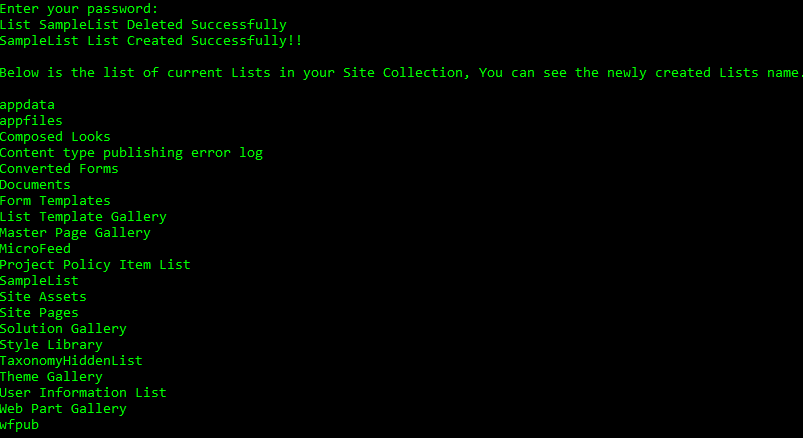
Below is the output of above code:

Creating Lists through Site Collection

You can create a List using any of the above templates through Site Collection UI. Below are the steps:

  1. Login to Site Collection. Click on the gear icon (Settings) on top right corner of the Site Collection.
  2. Select Add An App from the drop down.
  3. Select the template that you want to use to create your list.
  4. Give the name of the List and select create.

You will be able to see your newly created list in Site Contents and Quick Launch bar.

Power Platform Academy

Start or Upgrade your Career with Power Platform

Learn with Akanksha

Python | Azure | AI/ML | OpenAI | MLOps

Design a site like this with WordPress.com
Get started