Below are some sample code for Lists created using Client-Site Object Model with .NET.
class Program
{
        static void Main(string[] args)
        {
            string username = "Your Username";
            string siteURL="Your SiteURL";
            Console.WriteLine("Enter your password: ");
            SecureString password = GetPassword();
            string listname = "SampleList";
            CSOMList.CreateNewList(siteURL, username, password, listname);
        }
        public static SecureString GetPassword()
        {
            ConsoleKeyInfo info;
            SecureString securePassword = new SecureString();
            do{
                info = Console.ReadKey(true);
                if(info.Key!=ConsoleKey.Enter)
                {
                    securePassword.AppendChar(info.KeyChar);
                }
            }
            while(info.Key!=ConsoleKey.Enter);
            return securePassword;
        }
}
class CSOMList
{
        // Get all the existing lists in the current web
        public static void GetAllWebLists(string siteURL, string username, SecureString password)
        {
            using (ClientContext context = new ClientContext(siteURL))
            {
                context.Credentials = new SharePointOnlineCredentials(username, password);
                Web web = context.Web;
                context.Load(web.Lists, lists => lists.Include(list => list.Title, list => list.Id));
                context.ExecuteQuery();
                foreach (List list in web.Lists)
                {
                    Console.WriteLine(list.Title);
                }
                Console.ReadLine();
            }
        }

        // Create new list. Checks whether lists exists or not.
        // If exists, delete and recreate it.
        // You can modify the code as per your requirement like ask user before deleting ett.
        public static void CreateNewList(string siteURL, string username, SecureString password, string listname)
        {
            using(ClientContext context=new ClientContext(siteURL))
            {
                context.Credentials = new SharePointOnlineCredentials(username, password);
                Web web = context.Web;

                int result = CheckIfListExits(siteURL, username, password, listname);
                if (result == 1)
                    DeleteList(siteURL, username, password, listname);

                ListCreationInformation info = new ListCreationInformation();
                info.Title = listname;
                info.QuickLaunchOption = QuickLaunchOptions.On;
                info.TemplateType = (int)ListTemplateType.Contacts;
                List newList = web.Lists.Add(info);

                // Updating list info. You can do it in another method as well.
                newList.Description = "My Sample List";
                newList.Update();
                context.ExecuteQuery();
                Console.WriteLine(listname + " List Created Successfully!!");
                Console.WriteLine("\nBelow is the list of current Lists in your Site Collection, You can see the newly created Lists
                                   name.\n");
                GetAllWebLists(siteURL, username, password);
            }
        }

        // Delete List
        public static void DeleteList(string siteURL, string username, SecureString password, string listname)
        {
            using (ClientContext context = new ClientContext(siteURL))
            {
                context.Credentials = new SharePointOnlineCredentials(username, password);
                Web web = context.Web;
                List list = web.Lists.GetByTitle(listname);
                list.DeleteObject();
                context.ExecuteQuery();
                Console.WriteLine("List " + listname + " Deleted Successfully");
            }
        }

        // Check if list already exisis or not.
        // Return 1, if exists; 0 if not.
        public static int CheckIfListExits(string siteURL, string username, SecureString password, string listname)
        {
            using(ClientContext context=new ClientContext(siteURL))
            {
                context.Credentials = new SharePointOnlineCredentials(username, password);
                Web web = context.Web;
                context.Load(web.Lists, lists => lists.Include(list => list.Title));
                context.ExecuteQuery();
                foreach (List list in web.Lists)
                {
                    if (list.Title == listname)
                        return 1;
                }
                return 0;
            }
        }
}
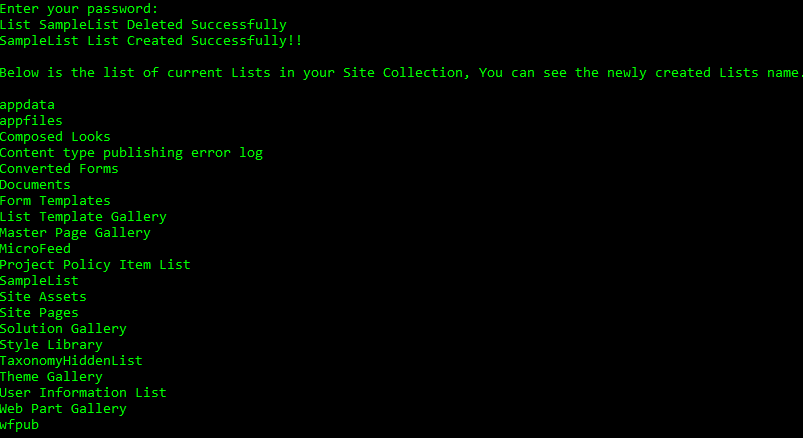
Below is the output of above code:
 Akanksha's Blog