Arrays topic in TypeScript is divided into following parts:
- Introduction to Arrays
- Array Objects
- Methods in Arrays – Part 1
- Methods in Arrays – Part 2
- Methods in Arrays – Part 3
- Multidimensional Arrays
- Arrays in functions
Below are the methods that are discussed in this section
| concat | every | filter |
| forEach | indexOf | join |
concat
This contacts two or more arrays and returns a new array.
Syntax
array1.concat(array2, array3,...);
Below is a sample code
var nums:string[] = new Array("10","20","30");
var chars:string[] = new Array('a','b','c');
var strings:string[] = new Array("Hello","Hi");
var i:number;
var newArray = strings.concat(chars, nums);
for(i=0; i<newArray.length; i++){
    console.log(newArray[i]);
}
Below is the output of above code

every
This method tests whether all array elements passes the test implemented by the function.
– Returns true is all the array elements passes in the function test, otherwise false.
– functionName is the name of the function used to test the array elements
Syntax
arrayName.every(functionName);
Below is a sample code
// returns true
function test1(element, index, array) {
    return (element >= 10);
 }
 var nums1:number[] = [10,20,30];
 var result1 = nums1.every(test1);
 console.log("Test Value : " + result1);

 // returns false
 function test2(element, index, array) {
    return (element > 10);
 }
 var nums2:number[] = [10,5,30];
 var result2 = nums2.every(test2);
 console.log("Test Value : " + result2 );
Below is the output of above code

filter
This function will create a new array with the elements that passes a test implemented by a function.
– Returns a new array
– functionName is the name of the function used to test the array elements
Syntax
arrayName.filter(functionName);
Below is a sample code
function even(element, index, array) {
    return (element%2 == 0);
 }
 var nums1:number[] = [5,10,20,30,105,64];
 var result1 = nums1.filter(even);
 console.log("Even Numbers: " + result1);
Below is the output of above code

forEach
This method calls a function for each element in the array.
Syntax
arrayName.forEach(funcionName)
Below is an example
let users = ["Akanksha","Aarav","Anita","Raj"];
users.forEach(function(value){
    console.log(value);
});
Below is the output of above code

indexOf
This method will return the first index in which the element is found. It will return -1 if the element is not found.
– Returns the first index in which the element is found. It only returns one index even if the value is present at multiple indexes
– value: the value which we are looking in the array
– fromIndex: the index from which we want to start the search. This is optional. By default, it will start the search from the beginning of the array.
Syntax
arrayName.indexOf(value, [fromIndex[);
Below is an example
var nums:number[] = [10,20,30,20,40,50,10];
console.log("Original array: " + nums);
console.log("Search for value 20: " + nums.indexOf(20));
console.log("Search for value 20, search start from 2nd index: " + nums.indexOf(20,2));
console.log("Search for 50: " + nums.indexOf(50));
Below is the output of above code

join
This method joins all the array elements into a string. We can pass a custom separator which can be used to separate the array values in the string. By default, it will use comma (,) as a separator.
Syntax
arrayName.join(separator);
Below is an example
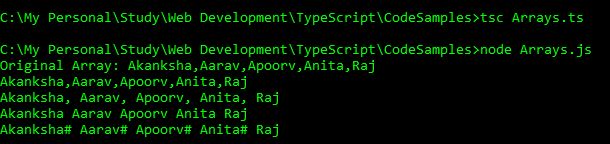
var users:string[] = ["Akanksha","Aarav","Apoorv","Anita","Raj"];
console.log("Original Array: " + users);
console.log(users.join());
console.log(users.join(", "));
console.log(users.join(" "));
console.log(users.join("# "));
Below is the output of above code





 Akanksha's Blog