Introduction to UiPath

These days business processes are becoming more and more complex which require higher degree of accuracy, needs to be completed in less time with minimum cost.

Robotic Process Automation (RPA) uses a computer (which acts as robot) to run an application in the same way a person will work with that software. RPA automates repetitive tasks that are performed by humans manually.

RPA can help users to enhance processes, remove the repetitive work, reduce cost, increase compliance, provide better customer experience and so on.

UiPath is an RPA tool which helps in automating business processes.

Products in UiPath

UiPath Studio: It is an advanced tool that enables you to design automation processes in a visual manner, through diagrams. This is powerful and user-friendly automation canvas are available on this. UiPath Studio has a lot of features which can be integrated with many languages.

UiPath Robot: It executes the processes built in UiPath Studio, as a human would. Robots can work unattended (run without human supervision in any environment, be it virtual or not) or as assistants (a human triggers the process). It execute the process with perfect accuracy, provided we have the set of perfect rules and accurate data.

UiPath Orchestrator: It is a web application that enables you to deploy, schedule, monitor and manage Robots and processes, while business exception handling is available through centralized work queues.It acts as a central platform in managing the overall performance of the automation process.

Types of UiPath Projects

There are two types of UiPath projects: Process and Library.

Process: This is a blank project which is used to design a new automation process. We can create all types of workflows in process: flowchart, sequence, state machine and global exception handler. When a new process is created in Studio, a folder with the project name is created at the default location: C:\Users\<username>\Documents\UiPath.

Library: It creates reusable components and publish them together as a library. Libraries can be added as dependencies to automation processes. They are saved in the form of files and can be installed when they are required to handle the excess workflows using the package manager.

Types of Workflows that can be created in UiPath

Sequence: We can create linear processes that moves from one stage to another without causing any disturbance to the flow.

Flowcharts: These workflows are created when the process requires some logic or require branching.

State Machines: We use state machines when our workflow is huge and requires a large number of transactions. State Machine uses infinite number of states in its execution which are triggered by a condition or transition or task.

Global Exception Handler: It is suitable for identifying the workflow behavior when it encounters an execution error.

 

Introduction to ReactJS

  • ReactJS is a front-end library developed by Facebook.
  • It handles the View layer of web and mobile applications.
  • We can also create reusable UI components.
  • ReactJS is used to show content (HTML) to users and handle user interaction.
  • ReactJS is a declarative, efficient, and flexible JavaScript library for building user interfaces.
  • Components in React
    • It lets you compose complex UIs from small and isolated pieces of code called components.
    • Everything in ReactJS is components. It helps in maintaining the large code.
    • A component is a function or class that produces HTML to show the user (using JSX) and handles feedback from the user (using Event Handlers).
    • React components are made using JavaScript functions or classes.
  • React can work by itself, but it can also work with other libraries, packages, databases and servers.
  • JSX (JavaScript Syntax Extension) is recommended to be used with ReactJS.
  • ReactJS implements one-way data flow using Flux.
  • ReactJS uses JavaScript virtual DOM to improve the performance of ReactJS apps.
  • We can use ReactJS with both client side and server side.
  • ReactJS covers only the view part of your app. You need to choose other technologies for the logical part of your app.
  • Before moving forward, let us setup the environment to develop ReactJS Apps. You can use any editor to create the apps. I will be using Visual Studio Code.
  • React is separated into two libraries
    • React knows what a component is and how to make components work together.
    • ReactDOM knows how to take a component and make it show up in the DOM.
  • We can use CDN links for React and ReactDOM for our application.

Introduction to TypeScript

  • TypeScript is a superset of JavaScript. TypeScript code is compiled into JavaScript code. TypeScript = JavaScript + Additional Features.
  • TypesScript files are saved with .ts. extension.
  • Any valid .js file can be renamed to .ts.
  • Compiled TypeScript can be consumed from any JavaScript code.
  • It is pure Object Oriented Language like C# or Java with classes, objects, interfaces, inheritance etc.
  • To learn TypeScript, you should have basic knowledge of JavaScript and Object Oriented concepts.
  • TypeScript is portable across browsers, devices and operating systems. It can run on any environment where JavaScript can run.
  • TypeScript provides with error-checking feature. It compiles the code and generate compilation error, if there are any syntax errors.
  • TypeScript is strongly typed script. Variable declared with no type can be inferred by TLS (TypeScript Language Service) based on its value.
  • TypeScript also supports  type definition for existing JavaScript libraries. TypeScript Definition file, .d.ts extension, provides definition for external JavaScript libraries.
  • When TypeScript is compiled, there is an option to create a declaration fie, which functions as an interface to the components in the compiled JavaScript.
  • Declaration files are similar to header files in C++.

Components of TypeScript

  • Language: It has syntax, keywords and type annotations.
  • TypeScript Compiler: TypeScript Compiler (TSC) converts the TypeScript code into JavaScript.
  • TypeScript Language Service: It exposes an additional layer around the core compiler pipeline that are editor-like applications.

What are PowerApps?

As per Microsoft, PowerApps is a suite of apps, services, connectors and data platform that provides a rapid application development environment to build custom apps for your business needs. Using PowerApps, you can quickly build custom business apps that connect to your business data stored either in the underlying data platform (Common Data Service for Apps) or in various online and on-premises data sources (SharePoint, Excel, Office 365, Dynamics 365, SQL Server, and so on).

PowerApps have a responsive design, and can run seamlessly in browser or on mobile devices (phone or tablet).

PowerApps allows developers and non-technical users to build applications from available templates. To create PowerApps, users need not to have developer expertise. Microsoft has introduced a visual design for PowerApps with drag-and-drop functionality with a familiar look of PowerPoint.

PowerApps can connect to various Microsoft-based and third-party applications, like Microsoft SQL Server, SharePoint, Dropbox, Google Docs, SAP, Oracle and Dynamics CRM etc.

Using PowerApps, you can create two types of apps: Canvas and model-driven.
To create an app, you start with web.powerapps.com.

  • Canvas Apps give you a lot of control over the user experience of the app. An app maker can use templates to create a canvas app, or they can configure the app any way they like. A canvas app, like its name, is a blank canvas, so you can create an app to fit the needs of users in your organization.
  • Model-driven apps uses UI that provides a responsive and accessible design. You can run the app on a web browser or on popular mobile devices. The app has multiple components including dashboards, forms, views, charts, and business processes that together help make the app easy to use. Model-driven apps are built and modeled on the Microsoft Dynamics 365 Customer Engagement framework, so the user experience is similar to Dynamics 365 Customer Engagement apps.
Create PowerApps using
  • PowerApps Studio is the app designer used for building canvas apps. The app designer makes creating apps feel more like building a slide deck in Microsoft PowerPoint.
  • App designer is for model-driven apps that lets you define the sitemap and add components to build a model-driven app.
PowerApps admins

They can use:

  • PowerApps Admin Center: admin.powerapps.com is used to create and manage environments, user roles and data-loss prevention policies. Click here for more details.
  • Power platform admin center: admin.powerplatform.microsoft.com to manage environments, get real-time, self-help recommendations and support for Dynamics 365 Customer Engagement, PowerApps, and Microsoft Flow, and view CDS for Apps analytics. Click here for more details.
PowerApps Developers

They are app makers who can write code to extend business app creation and customization. Developers can use code to create data and metadata, apply server-side logic using Azure functions, plug-ins, and workflow extensions, apply client-side logic using JavaScript, integrate with external data using virtual entities and webhooks, build custom connectors, and embed apps into your website experiences to create integrated solutions. More information: PowerApps for developers

Introduction to Customer Analytics

Customer Analytics is a process by which raw data can be turned into informative data which helps us to make important business decisions. We can use this analysis to retain old customers, acquire new customers, grow lifetime value and to enhance customer loyalty. There are easy-to-use analytics tools available in market for small and big businesses. These tools will collect and analyse the data to make predictions regarding customer behavior which in turn help to make business decisions. This is a necessity for competitive businesses.

In simple terms, Customer Analytics is the examination of customer information and behavior to identify, attract and retain the most profitable customer.

These days customers have access to information anywhere and anytime. They know what to buy, from where to buy, how much to pay etc. This makes it necessary to predict how customers behave while interacting with your organization, so that you should know how to respond. You can also plan how to change the product offers and prices, and look and feel of your product to attract new customers. You have to be future ready, this is how you can be successful in your business.This data can be anything climate information, posts by users on social media, digital pictures and videos, etc.

Customer Analytics helps you to acquire customers, grow revenue, maintain loyal customers, increase customer response rate and reduce campaign cost by targeting those customers more likely to respond.

Below are the four Vs which helps in analyzing the data:

  • Volume: The amount of data that we need to analyze.
  • Variety: Data is available in below forms:
    • Structured Data which is put into the form of rows and columns like Excel sheets.
    • Unstructured Data which is in the form of images, videos, audio, text etc. Most of the data we have is in unstructured form.
  • Velocity: The pace at which the data is increasing, and the way in which the customers are gaining knowledge of digital media, this data increasing at a very high pace.
  • Veracity: You should be able to make predictions about data.

Audit your data regularly to make it more valuable.
Focus on below areas while conducting data analysis:

  • Use various modes of statistical analysis to segment your customers.
  • Perform various data mining algorithms to find the hidden patterns and associations in the huge customer data.
  • Track individual customer on their tendency to respond, purchase or churn your product or service.
  • Perform analysis to understand the unstructured data like images, social media posts, audios, videos etc.
  • Use various planning and reporting tools available to understand the impact of your analysis on your business.
  • You should be able to predict the next best action for the growth of your business.

Always focus on increasing the below factors of your business:

  • Revenue
  • Customer Conversion Rate
  • Return on Investment (ROI)
  • Customer Satisfaction KPIs


MS Project 2013 Introduction

Microsoft Project Professional is a project management software developed by Microsoft. This software is basically used by project managers to create and manage their projects, assign resources to project tasks, track progress, manage budget of the project and analyze workloads.

A Project is a temporary endeavor undertaken to create a unique project, service or result. It is temporary because it has a defined start and end time, and a defined scope and resources.

A Project Management is a practice of applying knowledge, skills, tools and techniques to project so that it can be completed according to the defined requirements and within the defined time-period and scope with the defined resources.

Walk-through of MS Project 2013

Below are the steps to open MS Project 2013:

  1. Go to Start –> All Programs –> MS Office 2013. Click on MS Project 2013.
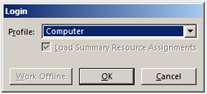
  2. You will be prompted to login. Choose Computer from the drop-down. Click OK.1

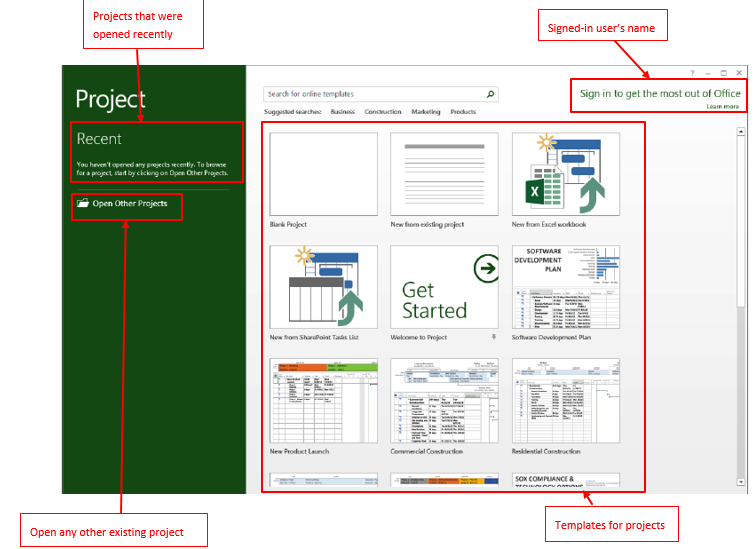
You will see below screen:

1 Continue reading “Walk-through of MS Project 2013”

Power Platform Academy

Start or Upgrade your Career with Power Platform

Learn with Akanksha

Python | Azure | AI/ML | OpenAI | MLOps

Design a site like this with WordPress.com
Get started