-
- A Component in ReactJS can be anything that can be placed on our application’s UI: a button, label, div tag, heading tag, etc.
- Components can be categorized in two categories
- Functional Components: We can use them when we want to show simple content to the user without a lot of logic behind it.
- Class-based Components: We use this components for complex logic like if we want your application to respond to user input, or make a network request etc. Benefits are:
- We can easily organize our code
- Can use ‘state’ to handle user inputs
- It understands lifecycle events like to do tasks when application starts
- Component Nesting: We can show one component inside another another component.
- Component Reusability: We can create a component which can be reused multiple times throughout the application.
- Component Configuration: We should create a component that should be easy to configure.
Let’s create a sample application where we are creating a component in a separate file, and nesting it into another component.
We have already created a Sample Application. Let’s continue with this one.
We will be creating a Comments component using Semantic UI React. We will be generating the sample data using FakerJS.
Comments.js
- Create a new file in src folder with the name Comments.js
- Write the below code in this file. This is a Functional Component.
import React from 'react';
import { Comment } from 'semantic-ui-react';
import faker from 'faker';

const Comments = function () {
    return (
        <Comment>
            <Comment.Avatar src={faker.image.avatar()} />
            <Comment.Content>
                <Comment.Author as='a'>{faker.name.firstName()}</Comment.Author>
                <Comment.Metadata>

<div>{faker.date.weekday()}</div>

                </Comment.Metadata>
                <Comment.Text>{faker.random.word()}</Comment.Text>
                <Comment.Actions>
                    <Comment.Action>Reply</Comment.Action>
                </Comment.Actions>
            </Comment.Content>
        </Comment>
    );
}

export default Comments;
- export statement is used so that we can use this component in other files.
index.js
Place the below code in index.js file
import React from 'react';
import ReactDOM from 'react-dom';
import { Comment } from 'semantic-ui-react';
import Comments from './Comments';

const App = function () {
    return (
        <Comment.Group>
             <Comments />
             <Comments />
             <Comments />
        </Comment.Group>
    );
};

ReactDOM.render(<App />, document.getElementById('root'));
-
- import Comments from ‘./Comments’ is used to import the data from Comments.js file.
- This is how we are placing the Comments component in the file. We can REUSE a single component multiple times and NEST it under other components.
<Comment.Group>
   <Comments />
   <Comments />
   <Comments />
</Comment.Group>
- There should only be one parent element to return. If you try to return more than one parent component, you will get an error: JSX expressions must have one parent element.
Below is the output of above code
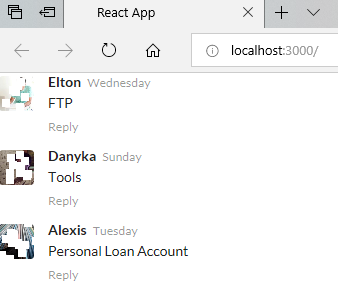
You can also convert it into ES6 function syntax by using arrow function. We recommend using this syntax as it has added advantages like we ca use this keyword with arrow functions, etc.
// Using ES6 function syntax (arrow function syntax) to declare Functional Components
const Comments = () => {
  // same as above
}
 Akanksha's Blog