Till Props in ReactJS we have seen parent-child components and passing values from parent component to child component.
In this article, we will be learning how to insert one custom component withing another custom component. Lets continue with the example we created in Props article.
Let’s create something like
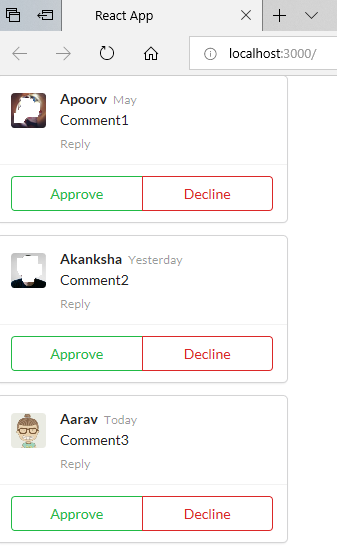
In above image, you can see that we have inserted the Comments within a Card, with two Buttons: Approve and Reject. The reference for the code is taken from Semantic UI React site.
ApprovalCard.js
Let us create a new file ApprovalCard.js in src folder. Paste the below code in it.
import React from 'react';
import { Card, Button } from 'semantic-ui-react';
import Comments from './Comments';

const ApprovalCard = function (props) {
    return (
        <Card>
            <Card.Content>
                <div>{props.children}</div>
            </Card.Content>
            <Card.Content extra>
                <div className='ui two buttons'>
                    <Button basic color='green'>
                        Approve
                    </Button>
                    <Button basic color='red'>
                        Decline
                    </Button>
                </div>
            </Card.Content>
        </Card>
    );
}

export default ApprovalCard;
Comments.js
We are not changing the code in this file. Below is the code for this file just for your reference.
import React from 'react';
import { Comment} from 'semantic-ui-react';
import faker from 'faker';

const Comments = function (props) {
    return (
            <Comment>
                <Comment.Avatar src={faker.image.avatar()} />
                <Comment.Content>
                    <Comment.Author as='a'>{props.user}          </Comment.Author>
                    <Comment.Metadata>
                        <div>{props.time}</div>
                    </Comment.Metadata>
                    <Comment.Text>{props.commentData}</Comment.Text>
                    <Comment.Actions>
                        <Comment.Action>Reply</Comment.Action>
                    </Comment.Actions>
                </Comment.Content>
            </Comment>
    );
}

export default Comments;
index.js
Below is the code
import React from 'react';
import ReactDOM from 'react-dom';
import { Comment } from 'semantic-ui-react';
import Comments from './Comments';
import Approvalcard from './ApprovalCard';

const App = function () {
    return (
        <Comment.Group>
            <Approvalcard>
                <Comments user="Apoorv" time="May" commentData="Comment1" />
            </Approvalcard>
            <Approvalcard>
                <Comments user="Akanksha" time="Yesterday" commentData="Comment2" />
            </Approvalcard>
            <Approvalcard>
                <Comments user="Aarav" time="Today" commentData="Comment3" />
            </Approvalcard>
        </Comment.Group>
    );
};

ReactDOM.render(<App />, document.getElementById('root'));
 Akanksha's Blog