ng-model Directive binds the value of AngularJS application data to HTML input controls.
ng-bind Directive tells AngularJS to replace the text content of HTML element with the value of the given expression, and to update the text content when the value of that expression changes.
Below is the sample code:
<!DOCTYPE html>
<html xmlns="http://www.w3.org/1999/xhtml">
<head>
    <script src="https://ajax.googleapis.com/ajax/libs/angularjs/1.3.14/angular.min.js"></script>
    <title>ng-bind and ng-model Directives</title>
</head>
<body ng-app="">
        <p>Enter your name: <input type="text" ng-model="name"/></p>
        <p>Hello <span ng-bind ="name"></span>!</p>
</body>
</html>
Below is the output of the above code when you run it in Internet Explorer.
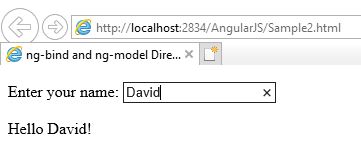
Whenever you write something in textbox, the text after Hello automatically starts changing.
 Akanksha's Blog