Below are the steps to setup the environment of Node.js on Windows:
-
- We need two softwares to develop Node.js applications: Text Editor and Node.js binary installables.
- Text Editor can be a Windows Notepad. We need to write our code in Notepad and save the file with .js extension.
- The source code is simply JavaScript code.
- We can install the latest version of Node.js from here. You can find the links for various Operating Systems and for 32-bit/64-bit operating systems.
- For Windows, an .msi file will be downloaded. You can run the setup and install the software. By default, it will be installed at C:\Program files\nodejs location.
- Now write the following code in a NotePad and save that file with the name hello.js. Let’s say you have saved this file at
console.log("Hello, World!") - Open the Command Prompt on Windows and write the following code.

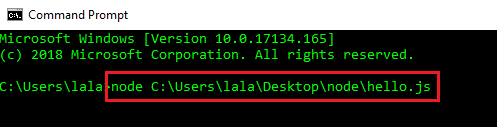
- When you press Enter, you will see Hello, World! written on Command Prompt.
Congrats! You have just created your first NodeJS application.
 Akanksha's Blog