Let’s continue with the article: Sample Web Part in SPFx
In this article, we will understand the folder structure of SPFx client-side web part.
Below are the important files and their description.
HelloWorldWebPart.ts
- HelloWorldWebPart.ts file is placed in src\webparts\helloworld folder.
- This is where the execution begins.
- There is a property defined as interface called IHelloWorldWebPartProps which is used to define custom property types of the web part.
- All the WebPart classes extends BaseClientSideWebPart class that is our HelloWorldWebPart class will also extend this base class.
- BaseClientSideWebPart implements basic functionality required to build a web part.
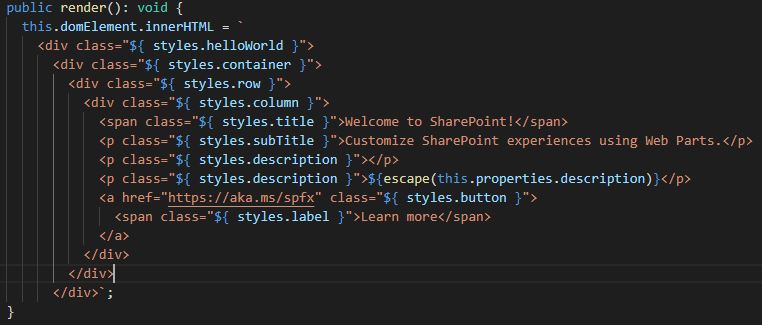
- HelloWorldWebPart class contains the render() method which renders the web part inside the DOM element.
- HelloWorldWebPart class contains the property pane where all the web part properties are defined: getPropertyPaneConfiguration.
render() method
- The DOM element where the web part should be rendered is available in the render() method.
- This method is used to render the web part inside the DOM element.
- We can access web part properties in render method by using this.properties.<value>. For example: ${escape(this.properties.description)}
- We are performing HTML escape on the property’s value to ensure a valid string.
- If the property value does not return a valid string, you need to explicitly convert the value in a valid string. For example: ${escape(JSON.parse(this.properties.toggle.toString()))}

getPropertyPaneConfiguration
- The properties are defined in HelloWorldWebPart.ts file in getPropertyPaneConfiguration.
- we can add multiple properties here.
- By default, it has only one property: description


WebPart Manifest File: HelloWorldWebPart.manifest.json
- Web Part metadata is stored in this file.
- This can be version details, id, component type, display name, description, icon, default properties etc.
- Every web part should have one manifest file.


 Akanksha's Blog