Event Handling in ReactJS

We can handle events in React like Click events, Keyboard events, Form events, Focus events, Mouse events etc. Here is the official documentation of events in React.

Let’s see a sample of button click event. Continue with state and props article.

In this example, we will change the state of the component using setState() function. We use setState() method to update the state property hence updating the DOM. setState() takes an object as argument and MERGES this argument with the existing state.

In the state and props article, we have defined two state properties: person and otherDetails. Hence if we modify person property, it will look for the changes only in persons property and leave otherDetails property as it is.
Below is the code in App.js file. The changes are done only in App.js file. No code changes are done in Person.js.

import React from 'react';
import './App.css';
import Person from './Person/Person';

class App extends React.Component {
  state = {
    person:[
      {name: "Paul", location: "New York"},
      {name: "David", location: "Atlanta"},
      {name: "Raj", location: "London"}
    ],
    otherDetails: "I am working as Software Developer"
  };

  buttonClickHandler = () => {
    this.setState({
      person:[
        {name: "Duke", location: "New York"},
        {name: "David", location: "Atlanta"},
        {name: "Raj", location: "Delhi"},
      ]
    })
  }

  render(){
    return (    
      <div>
        <Person name={this.state.person[0].name} location={this.state.person[0].location} />
        <Person name={this.state.person[1].name} location={this.state.person[1].location} >{this.state.otherDetails}</Person>
        <Person name={this.state.person[2].name} location={this.state.person[2].location} />
        <button onClick={this.buttonClickHandler} >Click Me</button>
      </div>

    );
  }
}

export default App;

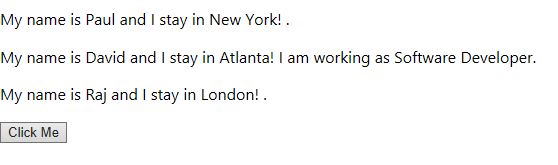
Below is the default output, before clicking the button.
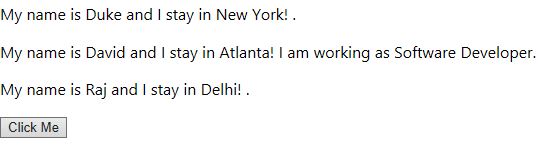
Below is the output after we click the button
setState() for State in ReactJS

      • We have seen what exactly a State is in ReactJS, how to initialize state data and update it.
      • setState() causes a component to re-render.
      • Before moving further, be aware of this that setState() function in ReactJS works in ASYNCHRONOUS fashion. That is, when we update state values, they are not immediately available for use.
      • Do not modify state directly, Use setState()
    this.state.value='Text'; is wrong. You can only use this in constructor
    this.setState({value: 'Text'}); is right
    • In this article, we will see ways to update state data.
    • There are two ways to update state data
      • Object based
      • Function based: We use Arrow Functions for this approch
index.js

Create a new application. Delete all files from src folder except index.js.
Below is the code that demonstrate both the approaches. Replace the code in index.js file with the below code.

import React from 'react';
import ReactDOM from 'react-dom';

class App extends React.Component {
    constructor(props) {
        super(props);
        this.state = { 
            funstr: 'Functional Original text!' , 
            objstr: 'ObjectBased Original String' 
        };
    }

    clickMeFA = () => {
        console.log('Functional based approach');
        console.log(this.state.funstr);
        this.setState(() => ({ 
            funstr: 'Functional Updated Text' 
            }),() => {
                console.log(this.state.funstr);
            });
    }

    clickMeOBA = () => {
        console.log('Object based approach');
        console.log(this.state.objstr);
        this.setState({ objstr: 'ObjectBased Updated Text' });
        console.log(this.state.objstr);
    }

    render() {
        return (
            <div>
                <button onClick={this.clickMeOBA}>Click Me     Objectbased</button>
                <button onClick={this.clickMeFA}>Click Me FuncBased</button>
            </div>
        );
    }
}

ReactDOM.render(<App />, document.getElementById('root'));

Below is the output of above code

Related Article

Event Handling in ReactJS: This article have another example related to setState()

Power Platform Academy

Start or Upgrade your Career with Power Platform

Learn with Akanksha

Python | Azure | AI/ML | OpenAI | MLOps

Design a site like this with WordPress.com
Get started