Arrays topic in TypeScript is divided into following parts:
- Introduction to Arrays
- Array Objects
- Methods in Arrays – Part 1
- Methods in Arrays – Part 2
- Methods in Arrays – Part 3
- Multidimensional Arrays
- Arrays in functions
Below are the methods that are discussed in this section
| reverse | shift | slice | some |
| sort | splice | toString | unshift |
reverse
This method place the array elements in the reverse order.
Syntax
array.reverse();
Below is a sample code
var orgArr:number[] = [10,20,300];
console.log("Original array: " + orgArr);
var newArr:number[];
newArr = orgArr.reverse(); // assign the reversed array in a new array
console.log("Reversed Array: " + newArr);
console.log("Original array is also modified: " + orgArr); // original array is also reversed
Below is the output of above code

shift
This method removes the first element of the array and returns that element, hence modifying the length of the array.
Syntax
array.shift();
Below is a sample code
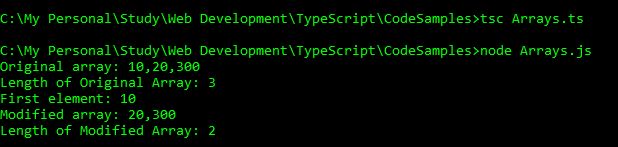
var orgArr:number[] = [10,20,300];
console.log("Original array: " + orgArr);
console.log("Length of Original Array: " + orgArr.length);
var num:number = orgArr.shift();
console.log("First element: " + num);
console.log("Modified array: " + orgArr);
console.log("Length of Modified Array: " + orgArr.length);
Below is the output of above code
slice
This method returns a new array extracted from the original array based on the beginIndex and endIndex.
– beginIndex: The index from where you want to start the extraction. If the is negative, You can extract only those elements from the end of the array. Do not put endIndex if beginIndex is negative.
– endIndex: The index till where you want to continue the extraction. The element at this index is not included in the new array. This is optional.
Syntax
array.slice(beginIndex [, endIndex]);
Below is a sample code
var orgArr:number[] = [10,20,30,40,50,60];
console.log("Original array: " + orgArr);
console.log("array.slice(0): " + orgArr.slice(0));
console.log("array.slice(1): " + orgArr.slice(1));
console.log("array.slice(0,2): " + orgArr.slice(0,2));
console.log("array.slice(1,2): " + orgArr.slice(1,2));
console.log("array.slice(1,3): " + orgArr.slice(1,3));
console.log("array.slice(-1,2): " + orgArr.slice(-1,2));
console.log("array.slice(-1): " + orgArr.slice(-1));
console.log("array.slice(-2): " + orgArr.slice(-2));
console.log("array.slice(-1,4): " + orgArr.slice(-1,4));
Below is the output of above code

some
This method tests whether some array element passes the test implemented by the function. This method is different from every() method where all the array elements have to pass the test.
– Returns true even if one array element passes in the function test. It will return false if all the array element fails in the function test.
– functionName is the function that tests the array elements
Syntax
array.some(functionName);
Below is an example
// returns true
function test1(element, index, array) {
    return (element >= 10);
 }
 var nums1:number[] = [1,2,3];
 var result1 = nums1.some(test1);
 console.log("Test Value : " + result1);

 // returns false
 function test2(element, index, array) {
    return (element >= 10);
 }
 var nums2:number[] = [10,5,30,2];
 var result2 = nums2.some(test2);
 console.log("Test Value : " + result2 );
Below is the output of above code

sort
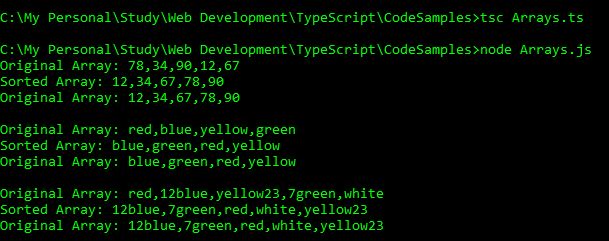
This method is used to sort the elements of the array based on a mentioned function. If the functionName is not specified, the array is sorted in lexicographically.
Syntax
array.sort(functionName);
Below is an example
var orgNumArr:number[] = [78,34,90,12,67];
console.log("Original Array: " + orgNumArr);
var newNumArr:number[] = orgNumArr.sort();
console.log("Sorted Array: " + newNumArr);
console.log("Original Array: " + orgNumArr);

var orgStrArr:string[] = ["red", "blue", "yellow", "green"];
console.log("\nOriginal Array: " + orgStrArr);
var newStrArr:string[] = orgStrArr.sort();
console.log("Sorted Array: " + newStrArr);
console.log("Original Array: " + orgStrArr);

var orgAlphaArr:string[] = ["red", "12blue", "yellow23", "7green","white"];
console.log("\nOriginal Array: " + orgAlphaArr);
var newAlphaArr:string[] = orgAlphaArr.sort();
console.log("Sorted Array: " + newAlphaArr);
console.log("Original Array: " + orgAlphaArr);
Below is the output of above code
splice
This method is used to add or remove array elements, hence modifying the array.
– index: index specifies the index from where we should start modifying the array.
– removeCount: this is used to mention the number of elements to be removed after the index. If you do not want to remove any element, specify 0.
– element1, element2,… : elements to be added in the array. This is optional. Mention the elements if you want to add the elements.
Syntax
array.splice(index, removeCount [element1, element2, ...]);
Below is an example
var orgArr:string[] = ["red", "blue", "yellow", "green","orange"];
console.log("Original Array: " + orgArr);
console.log("Original Length: " + orgArr.length);

console.log("\nAdding black at 3rd index and removing 0 elements.");
var element = orgArr.splice(3,0,"black");
console.log("Modified array: " + orgArr);
console.log("Removed element: " + element);
console.log("New Length: " + orgArr.length);

console.log("\nRemoving 1 element from 3rd index");
console.log("Array: " + orgArr);
var element = orgArr.splice(3,1);
console.log("Modified array: " + orgArr);
console.log("Removed element from 1st index: " + element);
console.log("New Length: " + orgArr.length);

console.log("\nRemove 2 elements from 2nd index then add white to 2nd index.");
console.log("Array: " + orgArr);
var element = orgArr.splice(2,2, "white");
console.log("Modified array: " + orgArr);
console.log("Removed element from 4th index: " + element);
console.log("New Length: " + orgArr.length);
Below is the output of above code

toString
Returns a string representing array and its elements.
Syntax
array.toString();
Below is an example
var orgArr:number[] = [10,20,30,40];
console.log("Original Array: " + orgArr);
console.log("typeOf of Original Array: " + typeof(orgArr));
var strArray = orgArr.toString();
console.log("String representation of array: " + strArray);
console.log("typeOf of Modified Array: " + typeof(strArray));
console.log("typeOf of Original Array: " + typeof(orgArr));
Below is the output of above code

unshift
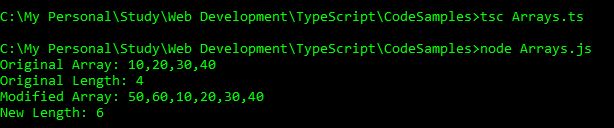
This method will add elements in the beginning of the array and returns the new length of the array,
Syntax
array.unshift(element1 [,element2, element3,...]);
Below is an example
var orgArr:number[] = [10,20,30,40];
console.log("Original Array: " + orgArr);
console.log("Original Length: " + orgArr.length);
var newLength = orgArr.unshift(50,60);
console.log("Modified Array: " + orgArr);
console.log("New Length: " + newLength);
Below is the output of above code






 Akanksha's Blog