Strings in TypeScript – Part 3

Strings in TypeScript is divided in three parts:

This section has the details of following methods:

toLocaleLowerCase toLocaleUpperCase toLowerCase
toUpperCase toString valueOf
toLocaleLowerCase()

This method will convert all the characters of a string in lower case representing the current locale.
Syntax

string.toLocaleLowerCase();

Below is a sample code

var str1 = new String("I like to eat MANGOES, WHICH are YELLOW in color");
console.log("Original String: " + str1);
console.log("Lower-case String: " + str1.toLocaleLowerCase());

Below is the output of above code

toLocaleUpperCase()

This method will convert all the characters of a string in upper case representing the current locale.
Syntax

string.toLocaleUpperCase();

Below is a sample code

var str1 = new String("I like to eat MANGOES, WHICH are YELLOW in color");
console.log("Original String: " + str1);
console.log("Upper-case String: " + str1.toLocaleUpperCase());

Below is the output of above code

toLowerCase()

This method will convert all the characters of a string in lower case.
Syntax

string.toLowerCase();

Below is a sample code

var str1 = new String("I like to eat MANGOES, WHICH are YELLOW in color");
console.log("Original String: " + str1);
console.log("Lower-case String: " + str1.toLowerCase());

Below is the output of above code

toUpperCase()

This method will convert all the characters of a string in upper case.
Syntax

string.toUpperCase();

Below is a sample code

var str1 = new String("I like to eat MANGOES, WHICH are YELLOW in color");
console.log("Original String: " + str1);
console.log("Upper-case String: " + str1.toUpperCase());

Below is the output of above code

toString()

This method returns the string representing the specified object. You can perform all the string operations on this converted object.
Syntax

object.toString();

Below is a sample code

var str1 = "I like to eat MANGOES, WHICH are YELLOW in color";
console.log("Original String: " + str1);
console.log(str1.toString());

Below is the output of above code

valueOf()

This method returns the primitive value of the String Object.
Syntax

string.valueOf();

Below is a sample code

var str1 = "I like to eat MANGOES, WHICH are YELLOW in color";
console.log("Original String: " + str1);
console.log(str1.valueOf());

Below is the output of above code

Strings in TypeScript – Part 2

Strings in TypeScript is divided in three parts:

This section has the details of following methods:

subString subStr split
slice search replace
match localeCompare lastIndexOf
lastIndexOf()

This method returns the last index of a specified value within a string. Search will start from the starting of the string. variable is the string in which we are searching for the value.
searchString is the value which we are searching in the variable.
fromIndex is an integer which specify the starting index for the search. It will return -1 if the string is not found.
Syntax

variable.lastIndexOf(searchString, [fromIndex])

Below is a sample code

var str1 = new String("This is a sample string sample");
console.log("Last Index of i: " + str1.lastIndexOf('i'));
console.log("Last Index of is: " + str1.lastIndexOf("is"));
console.log("Last Index of sample: " + str1.lastIndexOf("sample"));
console.log("Last Index of sample: " + str1.lastIndexOf("sample", 14));
console.log("Last Index of two: " + str1.lastIndexOf("two"));

Below is the output of above code

localeCompare()

This method will return an integer value after sorting two strings
Syntax

str1.localeCompare(str2);

– Returns 0 if str1 and str2 are equal.
– Returns 1 if str2 comes before str1 in the locale sort order.
– Returns -1 if str2 comes after str1 in locale sort order.

Below is an example

var str1 = new String("ab");
var str2 = new String("cd");    
var index1 = str1.localeCompare("ab");  
var index2 = str2.localeCompare("ab");  
var index3 = str1.localeCompare("cd"); 
console.log("Perfect Match: " + index1 );
console.log("Parameter value comes before the string value: " + index2 );
console.log("Parameter value comes after the string value: " + index3 );

Below is the output of above code

match()

This method searches a string for a match against a regular expression. This will return an array of all matches. Include g modifier to do a global search, that is in complete string. Otherwise it will return only the first match in the string. i is used to match without case-comparison. This method will return null if no match is found.
Syntax

variable.match(regexpre);

Below is an example

var str1 = new String("This is an example. ThiS IS good.");
console.log(str1.match(/is/g));
console.log(str1.match(/is/gi));

Below is the output of above code

replace

This method first finds a match between a regular expression and a string, then replaces the matched substring with another substring.
Syntax

variable.replace(regexp, substring);

Below is a sample code

var str1 = new String("I like to eat mangoes, but mangoes only come in summers. Mangoes are yellow in color.");
var result = str1.replace(/mangoes/gi,"apples");
console.log(result);

Below is the output of above code

This method searches a substring, using a regular expression, within a string and returns the index.
If the regular expression is not inside the string, it will return -1.
Syntax

string.search(regexp);

Below is a sample code

var str1 = new String("I like to eat mangoes, but mangoes only come in summers. Mangoes are yellow in color.");
var index = str1.search(/mangoes/gi);
console.log("First index of mangoes: " + index);

Below is the output of above code

slice()

This method extracts a section of a string and returns a new string. You can remove characters from beginning as well as from the end of the string. Giving the value fromEnd is optional.
Syntax

string.slice(fromBeginning, [fromEnd]);

Below is an example

var str1 = new String("I like to eat mangoes, but mangoes only come in summers.");
console.log(str1.slice(4,-5));

Below is the output of above code

split

This will split a string into array based on a substring. This method returns an array.
separator is the substring used to split a string.
limitOfValues is an integer value that tells how many values to return.
Syntax

string.spli(separator, [limitOfValues])

Below is an example

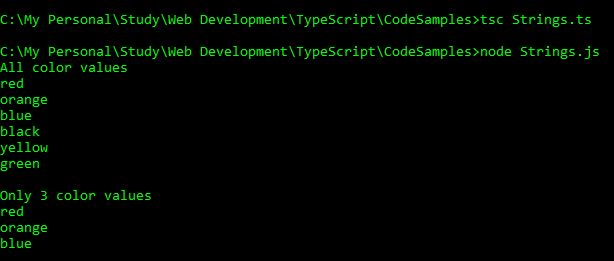
var str1 = new String("red,orange,blue,black,yellow,green");
var colors = str1.split(',');
var i:number;
console.log("All color values");
for(i=0; i<colors.length; i++)
{
    console.log(colors[i]);
}
var colors1 = str1.split(',',3);
var i:number;
console.log("\nOnly 3 color values");
for(i=0; i&lt;colors1.length; i++)
{
    console.log(colors1[i]);
}

Below is the output of above code

substr()

This method will return a new string.
startIndex represents the index from where we want to start extracting the substring.
length is a number representing the number of characters we want to extract. This is optional.
Syntax

string.substr(startIndex, [length]);

Below is a an example

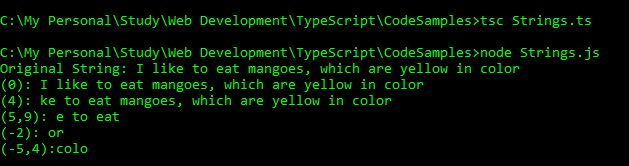
var str1 = new String("I like to eat mangoes, which are yellow in color");
console.log("Original String: " + str1);
console.log("(0): " + str1.substr(0));
console.log("(4): " + str1.substr(4));
console.log("(5,9): " + str1.substr(5,9));
console.log("(-2): " + str1.substr(-2));
console.log("(-5,4):" + str1.substr(-5,4));

Below is the output of above code

substring()

This method will return a new string between two indexes. It does not take negative values like we used in substr() method, hence we cannot start extraction from the end of the string.
startIndex is the starting index from where the extraction should begin
endIndex is the index where the extraction should end. This is optional.
Syntax

string.substring(startIndex,[endIndex]);

Below is an example

var str1 = new String("I like to eat mangoes, which are yellow in color");
console.log("Original String: " + str1);
console.log("(0): " + str1.substring(0));
console.log("(4): " + str1.substring(4));
console.log("(5,9): " + str1.substring(5,9));
console.log("(-2): " + str1.substring(-2));
console.log("(-5,4): " + str1.substring(-5,4));

Below is the output of the above code

Strings in TypeScript – Part 1

I am dividing Strings in three parts.

  • Part 1. This is Part 1
  • Part 2
  • Part 3
  • This section has the details of following topics:

    constructor length prototype
    charAt concat indexOf

    In simple terms, Strings is a collection of characters. We can create an object of String class and perform many functions on it.
    Syntax for creating a new String object and assigning value to it.

    var variableName = new String(value);
    
    String Constructor: String()

    It is used to create an object of String type. We can also assign an initial value to that String object.
    Below is an example of creating a String object, assigning a string value to it using a constructor and fetching that value.

    var str=new String("Hello");
    console.log(str.valueOf());
    

    Below is the output of above code

    length

    Returns the length of the string. Counts the white spaces as well. This will return the number.
    Syntax

    variable.Length
    

    Below is a sample code

    var str = new String("Hello World!!");
    console.log("Length of String: " + str.length);
    

    Below is the output of above code

    charAt()

    This method will return the character at a specified index. The index starts with 0(zero) and the index of the last character is string.length – 1. Index which is out of range returns nothing, not even undefined.
    Syntax

    variable.charAt(index);
    

    Below is a sample code

    var str = new String("Hello World!!");
    console.log("1st Character: " + str.charAt(0));
    console.log("3rd character: " + str.charAt(2));
    console.log("6th Character, which is space: " + str.charAt(5));
    console.log("7th character: " + str.charAt(6));
    console.log("Index which is out of range: " + str.charAt(13));
    

    Below is the output of above code

    concat()

    This method merges two or more strings into a one single string.
    Syntax

    string1.concat(string2, string3, ....);
    

    Below is a sample code

    var var1:string = "Hello ";
    var var2:string = "Friends!! ";
    var var3:string = "Good Morning.";
    var result = var1.concat(var2);
    var result1 = var1.concat(var2,var3);
    console.log("var1 + var2: " + result);
    console.log("var1 + var2 + var3: " + result1);
    

    Below is the output of above code

    indexOf

    This method returns the index of a specified value within a string. Search will start from the starting of the string. variable is the string in which we are searching for the value. searchString is the value which we are searching in the variable. fromIndex is an integer which specify the starting index for the search. It will return -1 if the string is not found.
    Syntax

    variable.indexOf(searchString, [fromIndex])
    

    Below is an example

    var str1 = new String("This is a sample string sample");
    console.log("Index of i: " + str1.indexOf('i'));
    console.log("Index of s: " + str1.indexOf('s', 8));
    console.log("Index of is: " + str1.indexOf("is"));
    console.log("Index of sample: " + str1.indexOf("sample"));
    console.log("Index of sample: " + str1.indexOf("sample", 14));
    

    Below is the output of above code

Power Platform Academy

Start or Upgrade your Career with Power Platform

Learn with Akanksha

Python | Azure | AI/ML | OpenAI | MLOps

Design a site like this with WordPress.com
Get started