Strings in TypeScript is divided in three parts:
This section has the details of following methods:
| subString | subStr | split |
| slice | search | replace |
| match | localeCompare | lastIndexOf |
lastIndexOf()
This method returns the last index of a specified value within a string. Search will start from the starting of the string. variable is the string in which we are searching for the value.
– searchString is the value which we are searching in the variable.
– fromIndex is an integer which specify the starting index for the search. It will return -1 if the string is not found.
Syntax
variable.lastIndexOf(searchString, [fromIndex])
Below is a sample code
var str1 = new String("This is a sample string sample");
console.log("Last Index of i: " + str1.lastIndexOf('i'));
console.log("Last Index of is: " + str1.lastIndexOf("is"));
console.log("Last Index of sample: " + str1.lastIndexOf("sample"));
console.log("Last Index of sample: " + str1.lastIndexOf("sample", 14));
console.log("Last Index of two: " + str1.lastIndexOf("two"));
Below is the output of above code

localeCompare()
This method will return an integer value after sorting two strings
Syntax
str1.localeCompare(str2);
– Returns 0 if str1 and str2 are equal.
– Returns 1 if str2 comes before str1 in the locale sort order.
– Returns -1 if str2 comes after str1 in locale sort order.
Below is an example
var str1 = new String("ab");
var str2 = new String("cd");
var index1 = str1.localeCompare("ab");
var index2 = str2.localeCompare("ab");
var index3 = str1.localeCompare("cd");
console.log("Perfect Match: " + index1 );
console.log("Parameter value comes before the string value: " + index2 );
console.log("Parameter value comes after the string value: " + index3 );
Below is the output of above code

match()
This method searches a string for a match against a regular expression. This will return an array of all matches. Include g modifier to do a global search, that is in complete string. Otherwise it will return only the first match in the string. i is used to match without case-comparison. This method will return null if no match is found.
Syntax
variable.match(regexpre);
Below is an example
var str1 = new String("This is an example. ThiS IS good.");
console.log(str1.match(/is/g));
console.log(str1.match(/is/gi));
Below is the output of above code

replace
This method first finds a match between a regular expression and a string, then replaces the matched substring with another substring.
Syntax
variable.replace(regexp, substring);
Below is a sample code
var str1 = new String("I like to eat mangoes, but mangoes only come in summers. Mangoes are yellow in color.");
var result = str1.replace(/mangoes/gi,"apples");
console.log(result);
Below is the output of above code

search()
This method searches a substring, using a regular expression, within a string and returns the index.
If the regular expression is not inside the string, it will return -1.
Syntax
string.search(regexp);
Below is a sample code
var str1 = new String("I like to eat mangoes, but mangoes only come in summers. Mangoes are yellow in color.");
var index = str1.search(/mangoes/gi);
console.log("First index of mangoes: " + index);
Below is the output of above code

slice()
This method extracts a section of a string and returns a new string. You can remove characters from beginning as well as from the end of the string. Giving the value fromEnd is optional.
Syntax
string.slice(fromBeginning, [fromEnd]);
Below is an example
var str1 = new String("I like to eat mangoes, but mangoes only come in summers.");
console.log(str1.slice(4,-5));
Below is the output of above code

split
This will split a string into array based on a substring. This method returns an array.
– separator is the substring used to split a string.
– limitOfValues is an integer value that tells how many values to return.
Syntax
string.spli(separator, [limitOfValues])
Below is an example
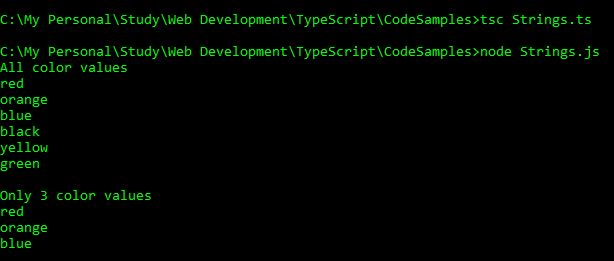
var str1 = new String("red,orange,blue,black,yellow,green");
var colors = str1.split(',');
var i:number;
console.log("All color values");
for(i=0; i<colors.length; i++)
{
console.log(colors[i]);
}
var colors1 = str1.split(',',3);
var i:number;
console.log("\nOnly 3 color values");
for(i=0; i<colors1.length; i++)
{
console.log(colors1[i]);
}
Below is the output of above code
substr()
This method will return a new string.
– startIndex represents the index from where we want to start extracting the substring.
– length is a number representing the number of characters we want to extract. This is optional.
Syntax
string.substr(startIndex, [length]);
Below is a an example
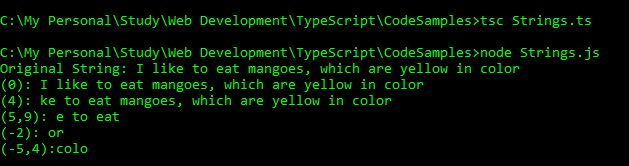
var str1 = new String("I like to eat mangoes, which are yellow in color");
console.log("Original String: " + str1);
console.log("(0): " + str1.substr(0));
console.log("(4): " + str1.substr(4));
console.log("(5,9): " + str1.substr(5,9));
console.log("(-2): " + str1.substr(-2));
console.log("(-5,4):" + str1.substr(-5,4));
Below is the output of above code
substring()
This method will return a new string between two indexes. It does not take negative values like we used in substr() method, hence we cannot start extraction from the end of the string.
– startIndex is the starting index from where the extraction should begin
– endIndex is the index where the extraction should end. This is optional.
Syntax
string.substring(startIndex,[endIndex]);
Below is an example
var str1 = new String("I like to eat mangoes, which are yellow in color");
console.log("Original String: " + str1);
console.log("(0): " + str1.substring(0));
console.log("(4): " + str1.substring(4));
console.log("(5,9): " + str1.substring(5,9));
console.log("(-2): " + str1.substring(-2));
console.log("(-5,4): " + str1.substring(-5,4));
Below is the output of the above code

 Akanksha's Blog