Property ‘entries’ does not exist on type ‘ObjectConstructor’

When we try to read the entries of an object using Object.entries(), it gives the error: Property ‘entries’ does not exist on type ‘ObjectConstructor’.

To resolve this follow below:

  • Open config.js file.
  • Add following code. There might already be lib section, then add only es2017 under it.
"lib": [
    "es2017"
]

Modules in TypeScript

  • A module is designed to organize the code written in TypeScript.
  • There are two types of modules
    • Internal Modules
    • External Modules
Internal Modules
  • They are used to group classes, interfaces and functions in one group and can be exported to another module.
  • There functionality is pretty much similar to namespaces.
  • Internal Modules are still used in some code, but we prefer using namespaces now.
  • Syntax
        module ModuleName{
            export class className{
               // statements
            }
        }
 
External Modules
  • The are used to specify and load dependencies in multiple .js files.
  • External modules are not used when there is only one .js file.
  • Traditionally we use <script> tags to load .js file in a particular order, but these tags are not available every time, like in NodeJS.
  • There are two ways of loading dependent .js files from a single .js file
    • Client Side – RequireJS
    • Server Side – NodeJS
  • The syntax for declaring an external module is using keyword export and import.

Module Loader

  • To load JavaScript files externally, we need a module loader.
  • Module Loader is another .js library.
  • Most common module loader we use is RequireJS. This is an implementation of AMD (Asynchronous Module Definition) specification.
  • Instead of loading files one after the other, AMD can load them all separately, even when they are dependent on each other.

Namespaces in TypeScript

  • Namespace is used to group logically related code.
  • When we have multiple files with globally declared variables, there may be a possibility of overwriting or misusing these variables.
  • We use namespaces to solve this issue.
  • Namespace definition begins with namespace keyword followed by the namespace name.
  • Syntax: namespace namespaceName{ //code for namespace }
  • We define classes and interfaces within a namespace.
  • If we want to access these classes and interfaces from outside of namespace, they should be exported using export keyword.
  • To access the class or interface from another namespace, we use this syntax: namespaceName.className;

Below is the example
We have created two files: Namespace1.ts and Namespace2.ts

Namespace1.ts
namespace namespace1{
    export class Car{
        model:string;
        color:string;
        constructor(m:string, c:string){
            this.model = m;
            this.color = c;
        }
        carDetails():void{
            console.log(this.model + " is available in " + this.color + " color.")
        }
    }
    var myCar = new Car("Swift","Silver");
    myCar.carDetails();
}
Namespace2.ts
/// <reference path = "Namespace1.ts" />
namespace namespace2{
    console.log("\nIn Namespace2.ts file");
    var maruti = new namespace1.Car("Brezza","White");
    maruti.carDetails();
}

Now open Node.js Command Prompt and type the following two commands

tsc --out myjsfile.js Namespace2.ts
node myjsfile.js

Below is the output in Node.js Command Prompt

Access Modifiers in TypeScript

  • We can control the access and visibility of data members of a class to the data members of other class using Access Modifiers.
  • Hence, we can restrict the usage of data members of a class outside of its scope.
  • This phenomena is known as Data Hiding or Encapsulation.
  • This concept is used with Inheritance in Classes.
Access Modifier Description
public We can access these data members from anywhere within our program. By default, all the data members are public.
private We can access these data members only from within the scope of the class. If we try to use them from outside, it will throw an error.
protected These data members can be used from within the scope of the class in which it is defined, and also from its child classes.

Below is an example to illustrate the access modifiers

class ParentClass { 
    pubStr:string;
    private prvStr:string;
    protected protStr:string;
 } 
  
 class ChildClass extends ParentClass { 

    display():void { 
       console.log("\nDisplay method in Child Class!");
       //this.prvStr = "Private Data Member";
       this.protStr = "Protected Data Member in Child Class";
       console.log(this.pubStr);
       console.log(this.protStr);
    } 
}
var childObject = new ChildClass();
childObject.pubStr = "Public Data Member in Child Class";
//childObject.protStr = "Protected data Member";
//childObject.prvStr = "Protected data Member"; 
childObject.display();

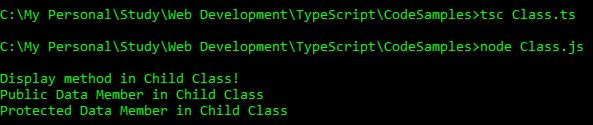
Below is the output of above code

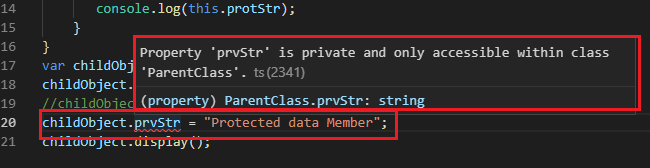
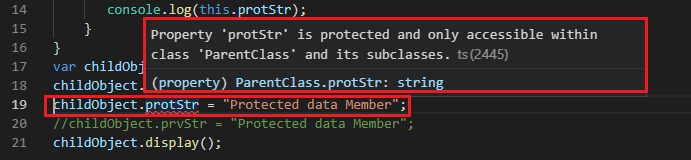
Below are the errors if we try to access private and protected data members outside of their scope. I have put comments in the above code. I will be removing these comments and will show you the error message in a screenshot.

Let’s see the error messages after removing the comments of the private access modifiers.


We cannot access private data members from anywhere outside of that class.

Let’s see the error messages after removing the comments of the protected access modifiers.

We can access the protected data members from within the child class only.

instanceof Operator in TypeScript

  • instanceof operator returns a boolean value.
  • It returns true if the specified object belongs to the specified Class.

Below is an example

class Car { 
    model:string;  
    carDetails():void{
        console.log("car is alloted!");
    }
}
class Bike{color:string}
var myCar = new Car();
console.log(myCar instanceof Car);
console.log(myCar instanceof Bike);

Below is the output of above code

static Keyword in TypeScript

  • static keyword is applied to the fields or methods of a Class.
  • static field retains its value till the program finishes execution.
  • There is no need to create an object to access the data members (fields or methods) of a class. They can be directly accessed by the name of the class. For example, ClassName.DataMember;

Below is an example related to static keyword and how we can use it.

  class Car { 
    static dealer:string;
    model:string;
    static allocationDetails():void{
        console.log("Car is alloted!");
    }     
    carDetails():void{
        console.log(this.model + " is available with " + Car.dealer);
    }
 }
 var myCar = new Car();
 myCar.model = "Hyundai Creta";
 Car.dealer = "ABC Sales";
 myCar.carDetails();
 Car.allocationDetails();

Below is the output of above code

Method Overriding in TypeScript

  • Method Overriding is a concept of Inheritance in Classes where a child class can override a function of a parent class. In this, child class may or may not use the logic of a function defined in parent class.
  • We use super keyword to refer to the functions or fields of the immediate parent class.

Below is an example of method overriding USING super. If we use super, the same method of parent class is executed.

class ParentClass { 
    display():void {
       console.log("Display method from Parent Class!") 
    } 
 } 
 
 class ChildClass extends ParentClass { 
    display():void { 
       super.display() 
       console.log("dislay method from Child Class!")
    } 
    hello():void{
        console.log("Hello from Child Class!");
    }
 } 
 
 var parentObj = new ParentClass();
 parentObj.display();
 var childObj = new ChildClass();
 childObj.display();
 childObj.hello();

Below is the output of above code

Below is an example WITHOUT using super. If we skip super, then that method of parent class is not executed. Only the method of child class is executed.

class ParentClass { 
    display():void {
       console.log("Display method from Parent Class!") 
    } 
 } 
 
 class ChildClass extends ParentClass { 
    display():void { 
       //super.display() 
       console.log("dislay method from Child Class!")
    } 
    hello():void{
        console.log("Hello from Child Class!");
    }
 } 
 
 var parentObj = new ParentClass();
 parentObj.display();
 var childObj = new ChildClass();
 childObj.display();
 childObj.hello();

Below is the output of above code

Inheritance in TypeScript

  • Inheritance is a concept in which we reuse the properties and methods of another class or interface, hence no need to rewrite the code again and again.
  • We use extend keyword to inherit other interfaces and classes.
  • We use an existing class to create a new class.
  • The class that is used to create the new class is called as parent class/super class. The newly created class is called as child class/sub class.
  • Child class inherits all the fields and methods from the parent class except the private fields and constructor.
  • Inheritance with Interface is explained in another article.

Syntax

class childClass extends parentClass{}

Below is an example of class inheritance

class Vehicle{
    model:string;
    color:string;
}
class Car extends Vehicle{
    fuelType:string;
}

class Maruti extends Car{
    customername:string;
    purchasedOn:string;
    
    constructor(custName:string, date:string, ){
        super();
        this.customername = custName;
        this.purchasedOn = date;   
    }
    purchaseDetails():void {
        console.log(this.customername + " purchased a car on " + this.purchasedOn);
        console.log("Model of the car: " + this.model+ "; Color: " + this.color + "; Fuel Type: " + this.fuelType);
    }
}
var car = new Maruti("Akanksha","28th Dec, 2018");
car.model = "Maruti Suzuki Dzire"
car.fuelType = "Diesel";
car.color = "Silver";
car.purchaseDetails();

Below is the output of above code

Other Related Articles

Classes in TypeScript
Interfaces and Classes in TypeScript
Interfaces in TypeScript
Access Modifiers
Method Overriding

Interface and Classes in TypeScript

Let’s implement Interfaces to Class.
Below is an example

interface IVehicle{
    model:string;
    color:string;
}
interface ICar extends IVehicle{
    fuelType:string;
}

class Car implements ICar{
    customername:string;
    purchasedOn:string;
    mycar1:ICar;
    model:string;
    color:string;
    fuelType:string;
    
    constructor(custName:string, date:string, car1:ICar){
        this.customername = custName;
        this.purchasedOn = date;   
        this.mycar1 = car1;
    }
    purchaseDetails():void {
        console.log(this.customername + " purchased a car on " + this.purchasedOn);
        console.log("Model of the car: " + this.mycar1.model+ "; Color: " + this.mycar1.color + "; Fuel Type: " + this.mycar1.fuelType);
        // Below line of code will only return undefined
        //console.log("Model of the car: " + this.model+ "; Color: " + this.color + "; Fuel Type: " + this.fuelType);
    }
}
var carDetails:ICar = {model:"Hyundai Creta", color:"White", fuelType:"Petrol"};
var car = new Car("Akanksha","28th Dec, 2018", carDetails);
car.purchaseDetails();

Below is the output of above code

Other Related Articles

Interfaces in TypeScript
Classes in TypeScript
Inheritance in TypeScript

Classes in TypeScript

  • TypeScript is an Object Oriented Language and hence we can create classes, interfaces, objects etc. in TypeScript.
  • We can create objects of the classes, hence classes encapsulates the data for the object.
  • We use class keyword to create classes in TypeScript.
  • Class name follows the rules same as variables.
  • Class definition includes:
    • Fields: A field is a variable declared in a class. They represents the properties of the object creates using the class. These fields can only be used by the objects of that class and their scope is limited to that class only.
    • Constructors: Constructors are used to allocate memory for the objects of the class. We can also use constructors to assign values to the fields of the object. Please note that we can define only one constructor in a class, multiple constructor declaration is not allowed. A constructor is a function which can be parameterized.
    • Functions: These are the operations or actions that an object can perform. They are also referred as methods.
  • We do not use var keyword to declare fields in a class.
  • this keyword refers to the current instance of the class. If the field name and constructor’s parameter names are same, we can use this keyword with fields to remove the ambiguity.
  • We use new keyword to create an object of the class.
    • Syntax: var objectName = new ClassName();
  • In above piece of code, ClassName() invokes the constructor of the class. If the constructor has parameters, we can pass the value of those parameters from here. For example: var objectName = new ClassName(value1, value2,….);
  • We access the field and methods of the class using the object followed by dot(.). For example,
    • to access field: objectName.field1;
    • to access function: objectName.functionName(parameterValue1, parameterValue2,…);

Syntax for creating class

class className{
  // class fields and methods
}

Below is an example, where we create a class, define fields, constructor and function. We then create an object of this class, initialize the fields and then invoke the function.

class Car{
    customername:string;
    purchasedOn:string;

    constructor(custName:string, date:string){
        this.customername = custName;
        this.purchasedOn = date;
    }
    purchaseDetails():void {
        console.log(this.customername + " purchased a car on " + this.purchasedOn);
    }
}
var car = new Car("Akanksha","28th Dec, 2018");
car.purchaseDetails();

Below is the output of above code

Other Related Articles

Interfaces in TypeScript
Interface and Classes in TypeScript
Inheritance in TypeScript
static keyword
instanceof Operator
Access Modifiers

Power Platform Academy

Start or Upgrade your Career with Power Platform

Learn with Akanksha

Python | Azure | AI/ML | OpenAI | MLOps

Design a site like this with WordPress.com
Get started