When you prefix a string literal with the @ symbol, you have created what is termed a verbatim string.
Using verbatim strings, you disable the processing of a literal’s escape characters and print out a string
as is. This can be most useful when working with strings representing directory and network paths.
Therefore, rather than making use of \\ escape characters, you can simply use @
Below is the sample code:
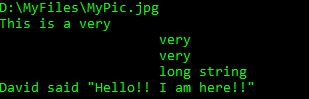
Console.WriteLine(@"D:\MyFiles\MyPic.jpg");
string myLongString = @"This is a very
    very
    very
    long string";
Console.WriteLine(myLongString);
Console.WriteLine(@"David said ""Hello!! I am here!!""");
Below is the output of above code:
 Akanksha's Blog