C# contains various escape characters, which defines how the data should be printed on the output stream. Each escape character begins with a backslash, followed by a specific token.
Below is a table explaining the escape characters:
| Escape Character | Description |
|---|---|
| \’ | Inserts a single quote into a string literal |
| \” | Inserts a double quote into a string literal |
| \\ | Inserts a backslash into a string literal. Used in defining file paths etc. |
| \a | Triggers a System sound. |
| \n | Inserts a new line |
| \r | Inserts a carriage return |
| \t | Inserts a horizontal tab into a string literal |
Below is the sample code explaining the above escape characters:
Console.WriteLine("\"Hello World\"");
Console.WriteLine("\'Hello World\'");
Console.WriteLine("D:\\MyFiles\\MyPic.jpg");
Console.WriteLine("System Sound: \a");
Console.WriteLine("Hello\nNew Line");
Console.WriteLine("Orange\tYellow\tRed");
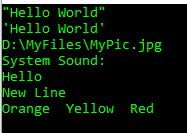
Below is the result of above code. You will also hear a system sound when this code is run.

 Akanksha's Blog