Below is the sample code for AngularJS Application:
<!DOCTYPE html>
<html xmlns="http://www.w3.org/1999/xhtml">
<head>
    <script src="https://ajax.googleapis.com/ajax/libs/angularjs/1.5.2/angular.min.js"></script>
    <title>Hello</title>
</head>

<body ng-app="myapp">

    <div ng-controller="HelloWorldController">
        <h3>Hello {{hello.title}} !!</h3>
    </div>

    <script>
        angular.module("myapp", [])
        .controller("HelloWorldController", function ($scope) {
            $scope.hello = {};
            $scope.hello.title = "Akanksha";
        });
    </script>
</body>
</html>
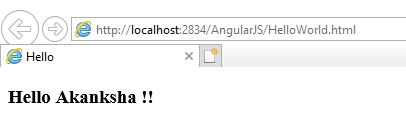
Below is the output of the above code when run in Internet Explorer. You can also use any other browser.
In the above code, we have first included the reference file to AngularJS in the HEAD section so that we can use it in our HTML page.
<head>
   <script src="https://ajax.googleapis.com/ajax/libs/angularjs/1.5.2/angular.min.js"></script>
   <title>Hello</title>
</head>
To bind HTML page to AngularJS, we have to include ng-app directive either in HTML tag or BODY tag. This helps HTML document to locate where AngularJS cod is located. Here we are creating an angular module named myapp.
<html ng-app = "myapp"></html> // OR
<body ng-app = "myapp"></body>
This is the View part of the AngularJS application that is displayed on HTML page and all HTML tags are included in this part. ng-controller tells AngularJS which controller to use with the current view. hello.title tells AngularJS to write the “model” value named hello.title to the HTML at this location.
<div ng-controller="HelloWorldController">
<h3>Hello {{hello.title}} !!</h3>
</div>
This is the Controller part of AngularJS application. This code registers a controller function HelloWorldController in myapp module. The controller function is registered in angular via angular.module().controller() function.
<script>
        angular.module("myapp", [])
        .controller("HelloWorldController", function ($scope) {
            $scope.hello = {};
            $scope.hello.title = "Akanksha";
        });
    </script>
The $scope parameter passed to the controller function is the model. The controller function adds a hello JavaScript object, and in that object it adds a title field.

 Akanksha's Blog