- State is a JavaScript object that contains data for a component.
- We can use State only in Class Components. We can use them in Functional Components by using hooks system.
- State and props are two different things, so do not get confused between the two.
- When we update State, the component is almost instantly rendered.
- We should initialize State when the component is created.
- State can ONLY be updated using the setState function.
Initialize State when the component is created
- We use constructor() function to initialize the State.
- This constructor() function is not related to ReactJS but is a JavaScript concept.
- We define constructor() inside the class.
- Whenever we create an instance of component, constructor() function is automatically and instantly called before anything else. Hence, this is the best way to initialize the State.
- When we define constructor(), it automatically calls props object. This is the same props that we discussed earlier in Functional Component.
- super()
- Before doing anything else inside constructor(), we have to call a function super() and pass props in it.
- We can see that our class extends functionality from React.Component base class. This base class has a constructor function that has the code for the component.
- The constructor() that we define in our class will override the constructor of the base class. To make sure that the base class’ constructor() code still gets called, we use super(props).
- If we do not call super(), we will get an error message “super() hasn’t been called“.
- super() should be the first statement in the constructor().
index.js
Below is a code to demonstrate the State by getting Longitude and Latitude of your current location. We will be using only one file in src folder: index.js. Place the below code in index.js file.
import React from 'react';
import ReactDOM from 'react-dom';

class App extends React.Component {
    constructor(props) {
        // super() is used to call the constructor of parent class
        super(props);

        // this is the only time we use direct assignment to state,
        // that is at the initialization time
        // we use null if we expect the value is either numerical or decimal
        this.state = { lat: null, long: null };

        window.navigator.geolocation.getCurrentPosition(
            position => {
                // update state data using setState() method
                this.setState({ lat: position.coords.latitude, long: position.coords.longitude });
            },
            err => console.log(err)
        );
    }
    render() {
        return (
            // this is how we use state data in our code
            <div>
                <b>Latitude:</b> {this.state.lat}
                <b>Longitude:</b> {this.state.long}
            </div>
        );
    }
}

ReactDOM.render(<App />, document.getElementById('root'));
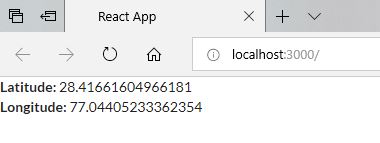
Below is the output of above code. It will change as per your location. Please note that you have to enable your location sharing for this example to work.

 Akanksha's Blog
2 thoughts on “State in ReactJS”